Introduction
Choosing between ClickUp vs Asana is not simply a matter of comparing task lists. Both platforms can manage projects, dependencies, forms, dashboards, automations, goals, and AI-assisted work. The more useful question is what each platform asks from your team in return.
ClickUp is the better overall choice for most teams that want maximum capability and value from one platform. It gives you deeper task controls, more project views, native Docs, Chat, Whiteboards, time tracking, sprint tools, and a lower starting price. Asana is the stronger choice when ease of adoption, clean navigation, and standardized portfolio reporting matter more than feature breadth.
ClickUp vs Asana at a Glance
Use this table for a fast recommendation. The sections below explain where the differences become operationally important.
| Comparison Area | ClickUp | Asana | Better Choice |
| Overall fit | All-in-one, highly configurable work platform | Structured, accessible work management | ClickUp for most value-focused teams |
| Ease of adoption | Powerful but denser | Cleaner and faster to learn | Asana |
| Task depth | Detailed hierarchy, task types, sprints, estimates | Clear tasks, subtasks, dependencies, milestones | ClickUp |
| Project views | More than 15 view types | Focused set of core project views | ClickUp |
| Automation | Flexible conditions and actions with plan allowances | Unlimited automations from Starter | Asana for simplicity, ClickUp for flexibility |
| AI | Brain AI, Brain MAX, agents, search, multiple models | AI Studio Basic, AI Teammates, workflow intelligence | ClickUp overall |
| Docs and communication | Docs, Wikis, Chat, Whiteboards, Clips, email | Task comments, messages, status updates, integrations | ClickUp |
| Reporting and goals | Configurable dashboards and portfolio tools | Polished portfolios, goals, workload, status reporting | Asana for strategic reporting |
| Time tracking | Native on Unlimited | Native on Advanced | ClickUp |
| Free plan | Unlimited members with usage limits | Up to two users | ClickUp |
| Starting annual price | $7 per user/month | $10.99 per user/month | ClickUp |
My recommendation: choose ClickUp when you want one system for detailed project execution, documentation, team communication, time tracking, and AI. Choose Asana when your highest priority is getting a broad, mixed-skill team into a consistent project management process with minimal configuration.
How ClickUp and Asana Were Compared
This comparison uses the same product-launch workflow in both platforms. The test includes intake through a form, 35 tasks across five phases, dependencies, approvals, two external guests, recurring work, time estimates, workload planning, documentation, campaign assets, an executive dashboard, and an AI-generated weekly update.
The evaluation prioritizes the outcomes that usually determine whether project management software succeeds after the initial demonstration.
| Evaluation Category | What Was Considered |
| Adoption | Navigation, onboarding, templates, and daily contribution effort |
| Execution control | Hierarchy, tasks, dependencies, recurrence, sprints, and views |
| Workflow design | Forms, automations, approvals, and cross-project actions |
| Visibility | Dashboards, portfolios, goals, workload, and status reporting |
| Collaboration | Comments, messages, documents, chat, files, and guest access |
| AI value | Search, drafting, summaries, agents, workflow automation, and cost |
| Total cost | Plan pricing, feature gates, AI add-ons, and replacement of other tools |
| Scalability | Permissions, governance, security, and administrative overhead |
ClickUp and Asana Platform Overviews
ClickUp
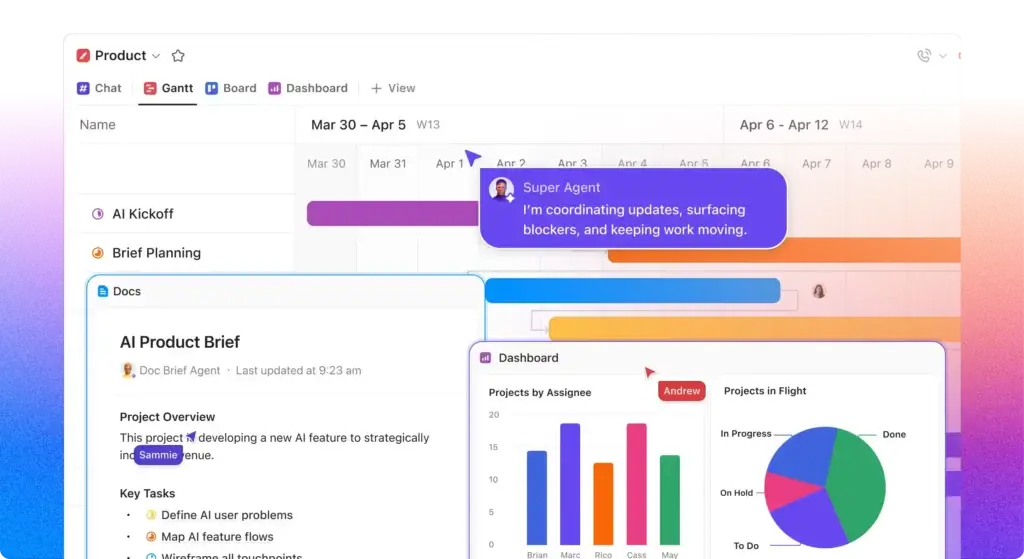
ClickUp is an all-in-one work platform organized through Workspaces, Spaces, Folders, Lists, tasks, and subtasks. It combines project management with Docs, Wikis, Chat, Whiteboards, Goals, dashboards, time tracking, Clips, email, sprints, automations, and an expanding AI suite.
ClickUp Strengths
- Detailed task hierarchy and extensive workflow customization
- Native time tracking on the lower-priced Unlimited plan
- Built-in Docs, Wikis, Chat, Whiteboards, Clips, and email
- Strong sprint, workload, dashboard, and automation capabilities
- Competitive free and paid plans for feature-heavy teams
- Broad AI assistant, search, agent, and desktop capabilities
ClickUp Limitations
- More setup decisions and a steeper learning curve
- Feature density can overwhelm occasional users
- Weak governance can create duplicate fields and inconsistent Spaces
- AI subscriptions can materially raise per-user costs
Read the full ClickUp review for a deeper analysis of its hierarchy, plans, and use cases.
Asana

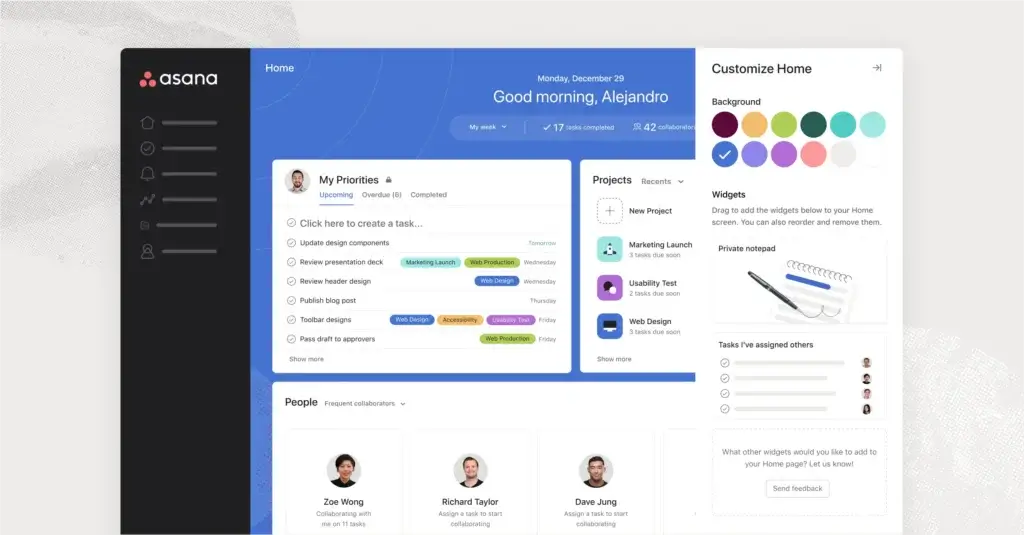
Asana is a work management platform built around teams, projects, tasks, subtasks, milestones, dependencies, custom fields, rules, portfolios, goals, and status updates. Its interface is more prescriptive than ClickUp’s, which reduces setup freedom but makes the platform easier to understand across departments.
Asana Strengths
- Clean interface and faster onboarding for mixed-skill teams
- Strong portfolios, goals, workload, and project status reporting
- Unlimited automations and free guests on Starter
- Reliable templates and structured cross-functional workflows
- AI Studio Basic credits included with paid plans
Asana Limitations
- Two-user free plan is too small for most working teams
- Advanced is expensive for portfolios, goals, workload, and time tracking
- No native documentation and wiki product comparable to ClickUp Docs
- Fewer view types and less task-level configuration
Read the full Asana review for more detail on its plans, workflows, and enterprise capabilities.
Ease of Use and Team Adoption
Asana Is Easier to Learn
Workspace Setup
Asana uses a relatively direct structure: organization, team, project, section, task, and subtask. You can choose a template, add owners and dates, switch between core views, and begin working without designing an extensive information architecture.
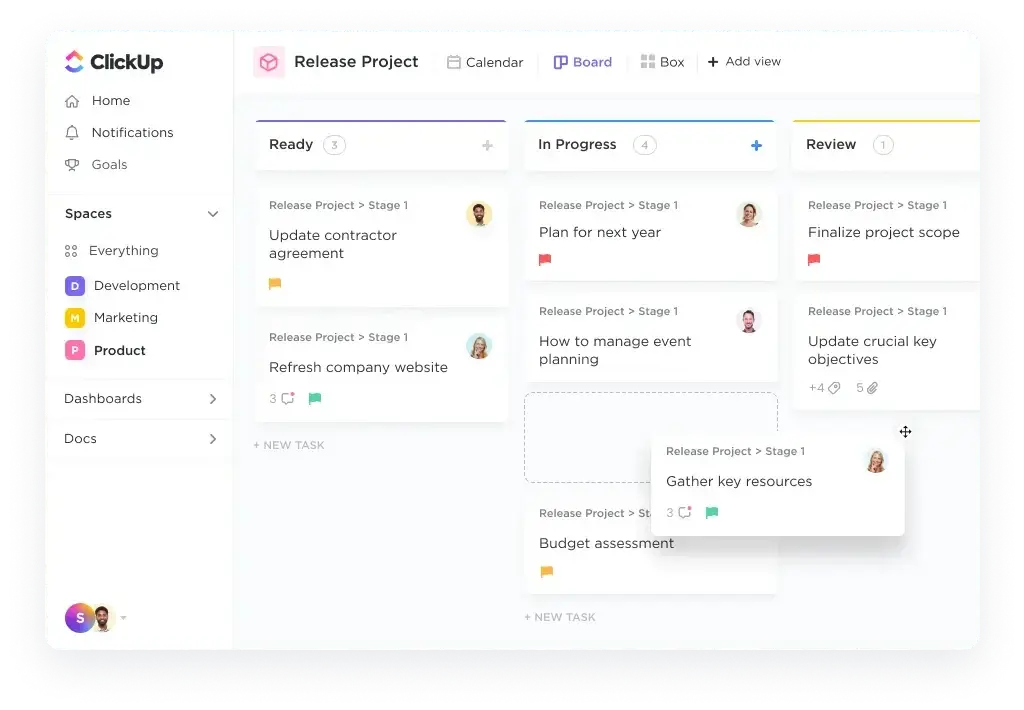
ClickUp introduces more layers. Spaces can represent departments, clients, or functions. Folders can represent programs or accounts. Lists can represent projects, sprints, or stages. This hierarchy becomes an advantage when work is complex, but it also creates more ways to organize the same process.
Daily Navigation
Asana is usually easier for occasional contributors. My Tasks, Inbox, project views, and status updates provide clear places to check work. The interface exposes fewer controls at once, so users can assign, complete, and comment without understanding every administrative option.
ClickUp has improved its navigation, but users still encounter more views, ClickApps, custom fields, task controls, Docs, Chat, and dashboard options. Power users appreciate that breadth. A stakeholder who signs in twice a week may need clearer onboarding.
Better choice for ease of use: Asana. ClickUp becomes efficient after setup, but Asana gets a broad team contributing correctly with less training.
Task and Project Management
ClickUp Provides More Execution Depth
Hierarchy, Task Types, and Relationships
Both tools cover the fundamentals: tasks, subtasks, owners, dates, priorities, dependencies, recurring work, custom fields, files, comments, milestones, and multiple project views.
ClickUp goes further. You can create custom task types, use multiple levels of nested work, add relationships, estimate time, assign multiple people, manage sprints, roll up fields, and standardize detailed task templates. The hierarchy gives agencies, product teams, and operations groups more ways to model clients, programs, deliverables, and recurring services.
Views and Planning
ClickUp offers more than 15 views, including List, Board, Calendar, Gantt, Timeline, Table, Workload, Mind Map, and Whiteboard-oriented planning. You can give the same dataset a detailed operational view for a project manager and a simplified filtered view for a stakeholder.
Asana focuses on List, Board, Calendar, Timeline, and Gantt, plus portfolio and workload views on higher plans. The smaller set is easier to govern and covers the most common planning needs, but ClickUp gives specialists more visual options without moving data into another product.
Better choice for task and project management: ClickUp. Asana wins on clarity, while ClickUp supports a wider range of execution models inside the same workspace.
Workflow Automation and Intake
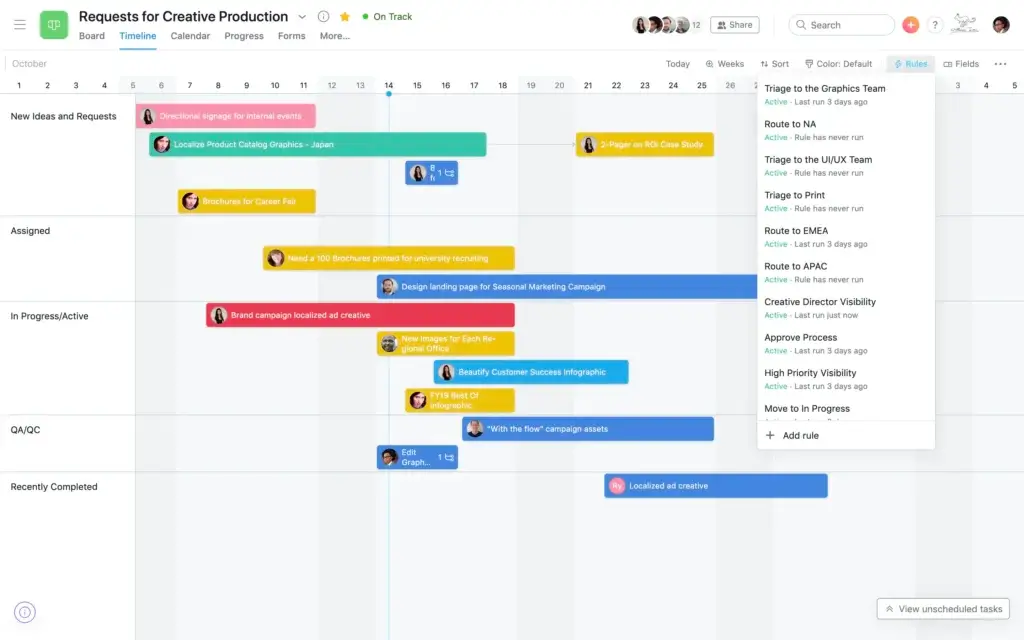
Asana Is Simpler, ClickUp Is More Configurable
Forms and Request Management
Both products can turn form submissions into structured work. Asana Starter includes forms, custom fields, templates, and unlimited automations. Advanced adds branching and deeper form customization, making Asana effective for campaign requests, creative intake, IT requests, and operational approvals.
ClickUp Unlimited includes unlimited forms, custom fields, integrations, and flexible task creation. Automations can assign work, change statuses, update fields, post comments, move tasks, create subtasks, and trigger integration actions. The advantage is that form data can feed a deeper hierarchy and connect with Docs, time tracking, and Chat.
Automation Limits and Governance
Asana’s unlimited automations on Starter are attractive for teams that want predictable rule-based workflows without monitoring monthly action allowances. The interface encourages standardized triggers and actions that remain understandable to project administrators.
Better choice for simple, scalable rule automation: Asana. Better choice for configurable automation connected to a broader workspace: ClickUp. ClickUp still receives the overall edge when automation is one part of a larger all-in-one operating system.
AI Features and Agentic Work
ClickUp Offers the Broader AI Workspace
ClickUp Brain AI and Everything AI
ClickUp Brain is designed as a contextual assistant across tasks, Docs, Chat, and connected work. It can answer workspace questions, draft content, summarize projects, search across work, assist with prioritization, and provide access to multiple AI models. Brain MAX extends the experience to a desktop app with enterprise search and talk-to-text capabilities.
Asana AI Studio and AI Teammates
Asana includes AI Studio Basic credits with paid plans. Starter includes 50,000 credits per billing account each month, Advanced includes 75,000, and Enterprise includes 200,000. This lets teams test AI-powered workflows without buying a separate per-user assistant for every member.
Which AI Strategy Is Better?
Asana has the pricing advantage for teams that only need limited AI workflow actions because Basic credits are included in paid plans. It also provides a strong governance story for AI agents operating inside structured projects.
ClickUp is more compelling when individual users want an assistant that can search, write, summarize, take meeting notes, use multiple premium models, and act across tasks, Docs, Chat, and desktop work. It feels less like a feature attached to project management and more like a separate AI productivity layer.
Better choice for included AI workflow experimentation: Asana. Better overall AI platform: ClickUp. Test your real usage before purchasing because per-user subscriptions and credit consumption can change total cost quickly.
Collaboration, Docs, and Communication
ClickUp Can Replace More Separate Tools
Asana keeps collaboration close to projects. You can comment on tasks, mention colleagues, attach files, send messages, post structured status updates, and invite unlimited free guests on Starter. This approach is organized and reduces the risk that final decisions disappear inside an unrelated chat channel.
ClickUp includes a much wider collaboration set. Docs and Wikis can store briefs, processes, onboarding guides, and meeting notes. Chat supports real-time conversations. Whiteboards support visual planning. Clips record screen explanations. Email can be sent and received within ClickUp. These objects can connect directly to tasks and projects.
Asana is better when your company already has established Slack, Microsoft Teams, Notion, or Confluence workflows and only needs a dependable project coordination layer. ClickUp is better when you are intentionally consolidating more of the work stack.
Better choice for collaboration breadth and tool consolidation: ClickUp.
Dashboards, Portfolios, Goals, and Resource Management
Asana Is Stronger for Structured Executive Reporting
Asana’s Advanced plan is designed around portfolios and goals. Portfolios roll up projects, project owners, status, dates, and custom fields. Goals connect strategic objectives to supporting work. Workload helps managers view capacity inside portfolios, while Universal Workload and capacity planning are available at enterprise levels.
This structure is especially effective for PMOs and leadership teams that want a consistent status language across many projects. Project status updates also encourage managers to explain health, risks, and next steps rather than relying only on automated charts.
Better choice for polished portfolio and goal reporting: Asana. Better choice for highly customized operational dashboards: ClickUp.
Time Tracking, Workload, and Agency Operations
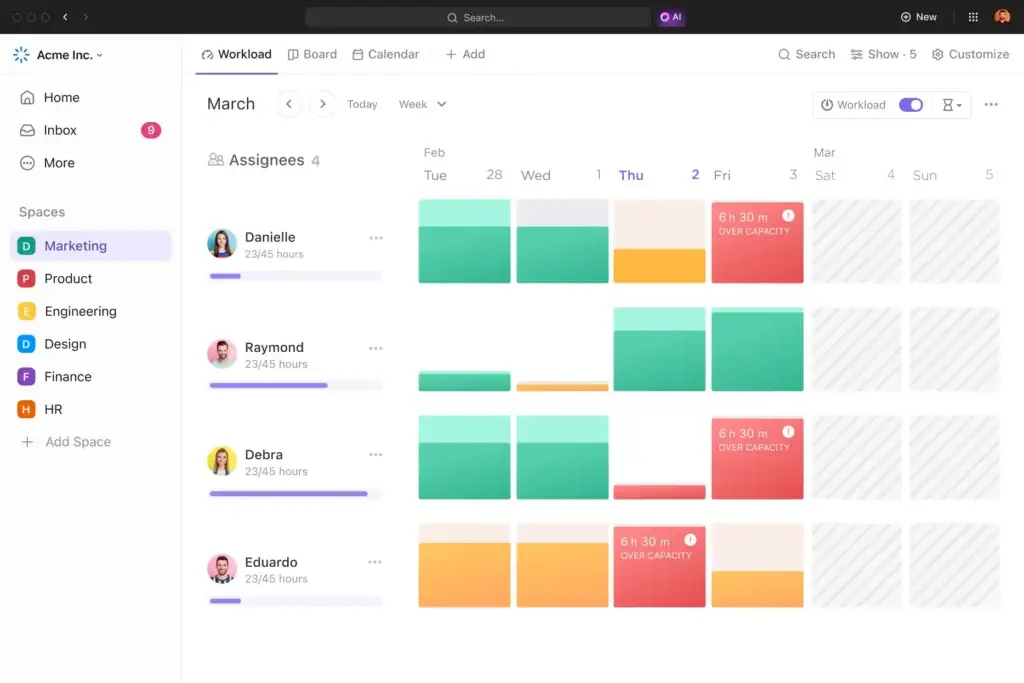
ClickUp Delivers More at Lower Tiers
ClickUp Unlimited includes native time tracking, resource management, goals, and portfolio management at $7 per user per month on annual billing. Users can start timers from tasks, add time manually, use estimates, and report time across projects. Business adds portfolio workload management and more advanced dashboards.
Asana provides time tracking, workload, portfolios, goals, approvals, and proofing on Advanced at $24.99 per user per month on annual billing. Those features are well integrated, but the price difference is substantial for agencies and service teams that need billable time or capacity planning.
Better choice for agencies, consulting teams, and time-based delivery: ClickUp.
Integrations and Extensibility
ClickUp says it can connect with more than 1,000 tools and includes unlimited integrations on Unlimited. Common options cover Slack, Microsoft Teams, Google Drive, GitHub, HubSpot, Salesforce, calendars, storage, and development platforms. Its public API, webhooks, email features, and automation integrations expand what the workspace can control.
Asana promotes more than 400 native integrations, with support for major collaboration, file, CRM, development, and business intelligence products. Starter includes more than 100 free integrations, while Advanced adds direct support for tools such as Salesforce, Tableau, and Power BI.
Better choice: close. ClickUp offers the larger advertised ecosystem and more ways to keep work inside one platform. Asana can be easier to govern as a focused work management layer connected to an established enterprise stack.
Pricing and Total Cost
ClickUp has the stronger base value. Its free plan supports unlimited members, while Asana Personal supports two users. ClickUp Unlimited costs $7 per user per month on annual billing, compared with $10.99 for Asana Starter. The difference becomes larger when you need time tracking, portfolios, workload, and goals.
| Plan Level | ClickUp | Asana |
| Free | Unlimited members, 60MB storage, core tools | Up to 2 users, unlimited tasks and projects |
| Entry paid | Unlimited at $7/user/month annually | Starter at $10.99/user/month annually |
| Advanced self-service | Business at $12/user/month annually | Advanced at $24.99/user/month annually |
| Native time tracking | Unlimited | Advanced |
| Portfolios and goals | Unlimited | Advanced |
| Advanced dashboards | Business | Starter dashboards, broader portfolio reporting on Advanced |
| AI | Brain AI $9 or Everything AI $28/user/month annually | AI Studio Basic credits included, paid AI tiers and Teammates available |
| Enterprise | Custom pricing | Custom pricing |
What a 10-Person Team Pays
At annual list pricing, 10 users cost $840 per year on ClickUp Unlimited and $1,440 on ClickUp Business. Asana Starter costs $1,318.80 per year, while Asana Advanced costs $2,998.80.
AI can reverse part of the savings. Adding Brain AI for all 10 ClickUp users adds $1,080 per year. Everything AI adds $3,360. Asana’s included AI Studio Basic credits may be enough for limited workflows, but teams that need AI Studio Plus, Pro, or AI Teammates should request a usage-based quote.
Hidden Cost Checklist
- Implementation and workspace architecture
- Training for contributors and administrators
- Separate documentation, chat, or time-tracking subscriptions
- AI seats, credits, and usage overages
- Automation volume and integration maintenance
- Data migration and workflow recreation
- Inactive paid members and guest rules
Better choice for subscription value: ClickUp. Asana can justify its premium when faster adoption and cleaner portfolio reporting reduce administrative effort, but ClickUp includes substantially more capability before you reach higher tiers.
Security, Administration, and Enterprise Readiness
Both vendors provide mature enterprise controls, but the strengths differ. ClickUp lists SAML SSO, SCIM provisioning, audit logs, session management, custom roles, data residency, enterprise API access, and governance controls on Enterprise. It also reports SOC certifications and ISO standards covering security, privacy, cloud controls, and AI management.
Better choice for highly governed enterprise deployment: Asana. Better choice for enterprises that also prioritize consolidation and customization: ClickUp.
Which Platform Fits Your Team?
Choose ClickUp for Agencies and Professional Services
ClickUp combines client hierarchy, reusable templates, native time tracking, proofing, Docs, Chat, email, dashboards, and workload tools at a lower price. It is the stronger choice when service delivery and margin visibility must live together.
Choose Asana for Marketing Teams That Prioritize Adoption
Asana is excellent for campaign plans, calendars, dependencies, approvals, forms, status updates, and cross-functional launches. Choose it when contributors need a clean system and your organization already has separate tools for documentation and communication.
Choose ClickUp for Product and Software Teams
Native sprints, sprint points, burndown and velocity reporting, task estimates, nested work, Docs, Whiteboards, and customizable statuses make ClickUp the more complete option for teams that want Agile planning without adding a separate project product.
Choose Asana for PMOs and Strategy Execution
Asana’s portfolios, goals, structured status updates, workload, and enterprise workflow bundles make it strong for standardizing how departments report health and connect projects to objectives.
Choose ClickUp for Small Teams and Startups
ClickUp’s unlimited-member free plan and $7 Unlimited tier give a growing team more room to test, collaborate, and add capabilities. Asana’s free plan is limited to two users, so a real team reaches paid pricing quickly.
Choose Asana for Teams With Low Tolerance for Configuration
Asana provides fewer architectural decisions and a more consistent interface. It is safer when no one has time to become the long-term platform owner and your workflows do not require deep customization.
Pros and Cons of ClickUp vs Asana
| Platform | Main Advantages | Main Drawbacks |
| ClickUp | Feature depth, lower pricing, time tracking, Docs, Chat, AI breadth, sprints | Learning curve, setup effort, workspace clutter, added AI cost |
| Asana | Ease of use, portfolios, goals, adoption, automation simplicity, governance | Higher advanced-tier price, small free plan, fewer built-in productivity tools |
Migration and Trial Strategy
How to Test ClickUp vs Asana Before Buying
Do not run separate demonstrations with different workflows. Build the same recurring process in both products and invite the same participants. A two-week pilot is long enough to reveal where users hesitate and where reporting breaks.
- Create the same intake form and project template
- Add one project manager, two contributors, one guest, and one executive
- Track dependencies, time estimates, approvals, and weekly status
- Build one dashboard and one portfolio-level report
- Test an AI summary and one automated handoff
- Record setup time and every support question
Overall Recommendation
ClickUp is the better project management platform for most teams comparing ClickUp vs Asana. It wins on task depth, view options, native time tracking, collaboration breadth, documentation, sprint support, AI capabilities, free-plan usefulness, and paid-plan value.
Asana deserves the recommendation when usability and standardization outweigh feature breadth. Its cleaner interface, unlimited Starter automations, polished portfolios, goals, status updates, and enterprise governance make it a strong choice for PMOs, cross-functional organizations, and teams that already have an established communication and knowledge stack.
Frequently Asked Questions
-
Is ClickUp better than Asana?
ClickUp is better for most teams that want deeper task controls, native time tracking, Docs, Chat, more project views, and lower pricing. Asana is better when ease of use and standardized portfolio reporting are the main priorities.
-
Is ClickUp or Asana easier to use?
Asana is generally easier to learn because it has a cleaner interface and fewer workspace architecture decisions. ClickUp requires more setup, but it gives power users greater control once the workspace is standardized.
-
Is ClickUp cheaper than Asana?
Yes. ClickUp Unlimited starts at $7 per user per month with annual billing, while Asana Starter starts at $10.99. ClickUp also includes time tracking, portfolios, goals, Docs, and Chat at lower tiers.
-
Which has the better free plan, ClickUp or Asana?
ClickUp has the stronger free plan because it supports unlimited members, although storage and feature usage are limited. Asana Personal supports up to two users, making it better for individual planning than team deployment.
-
Which is better for agencies, ClickUp or Asana?
ClickUp is usually better for agencies because it includes native time tracking, client hierarchy, Docs, proofing, Chat, email, templates, and dashboards at a lower price. Asana is easier for simple campaign coordination.
-
Which platform has better automation?
Asana is better for simple, predictable automation because Starter includes unlimited automations. ClickUp offers more configurable task actions and integrations, but monthly automation allowances vary by plan.
-
Does ClickUp or Asana have better AI?
ClickUp has the broader AI platform, including workspace search, multiple AI models, Brain MAX, meeting tools, AI Fields, and agents. Asana includes AI Studio Basic credits on paid plans and focuses strongly on governed AI workflows.
-
Which is better for portfolio management?
Asana is better for polished portfolio and goal reporting, especially for PMOs. ClickUp provides flexible dashboards and portfolio tools at lower tiers, but consistent reporting requires stronger workspace governance.
-
Which is better for software development teams?
ClickUp is usually better for software teams because it includes native sprints, sprint points, burndown and velocity reporting, nested tasks, estimates, Docs, Whiteboards, and customizable statuses.
-
Can you migrate from Asana to ClickUp?
Yes. ClickUp provides a direct Asana importer for core tasks, assignees, dates, and project structure. Review custom fields, automations, dashboards, permissions, and archived data before completing the migration.