Introduction
This Asana review examines a structured project management platform built for teams that need clear ownership, reliable deadlines, and visibility across connected projects. You can organize everyday tasks, map dependencies, standardize requests, automate routine updates, and report on progress without managing the project through spreadsheets and disconnected conversations.
Its strongest fit is cross-functional work. Marketing, operations, product, HR, and leadership teams can use the same platform while keeping their own views, fields, templates, and approval steps. The interface is approachable, but Asana becomes significantly more capable once you move beyond the free plan and configure it around a consistent project management process.
Asana remains a strong option in 2026, particularly for teams that value structured execution and portfolio visibility. However, its two-user free plan and the cost of Advanced features mean you should compare it with monday.com, ClickUp, and Miro before committing to a larger rollout.
Quick Review
Asana at a Glance
| Review Area | Asana Assessment |
| Best for | Cross-functional project, program, and portfolio coordination |
| Standout strength | Structured tasks, dependencies, automations, goals, and reporting |
| Main limitation | Advanced planning and resource features become expensive |
| Free plan | Up to two users |
| Paid plans | Starter from $10.99 and Advanced from $24.99 per user monthly, billed annually |
| AI capabilities | AI Studio, AI Teammates, Asana Dash, and AI connectors |
| Best alternative | monday.com for the strongest balance of flexibility and usability |
| Our rating | 8.3/10 |
Project Management Capabilities
Asana's Core Features
Asana works best when you treat it as a shared operating system for projects rather than a simple to-do list. Its core features help you move from project intake to delivery while maintaining clear accountability.
Task Ownership, Dependencies, and Milestones
You can assign each task to a clear owner, add due dates, create subtasks, define dependencies, and mark important delivery points as milestones. This supports one of the most important project management principles: every deliverable should have one accountable owner and a visible relationship to the wider plan.
Dependencies are particularly useful when delays in research, design, approval, or development affect downstream work. Instead of discovering the problem at the deadline, you can see which tasks are blocked and adjust the schedule earlier.
List, Board, Calendar, Timeline, and Gantt Views
Asana lets you view the same project in several formats. Lists work well for detailed execution, boards show process stages, calendars highlight publishing or delivery dates, and Timeline and Gantt views help you plan sequencing and dependencies.
The underlying structure still matters. A Gantt chart will not fix unclear ownership or unrealistic dates, so standardize fields, milestones, and dependencies before scaling the project.
Forms, Rules, and Workflow Automation
Forms turn requests into structured tasks, which is valuable for creative briefs, campaign requests, IT work, onboarding, and operational intake. Rules can then assign owners, update fields, move tasks between sections, or notify stakeholders based on triggers.
Starter includes forms, custom fields, and unlimited automations, while Advanced adds branching forms and portfolio-level management.
Dashboards, Portfolios, and Goals
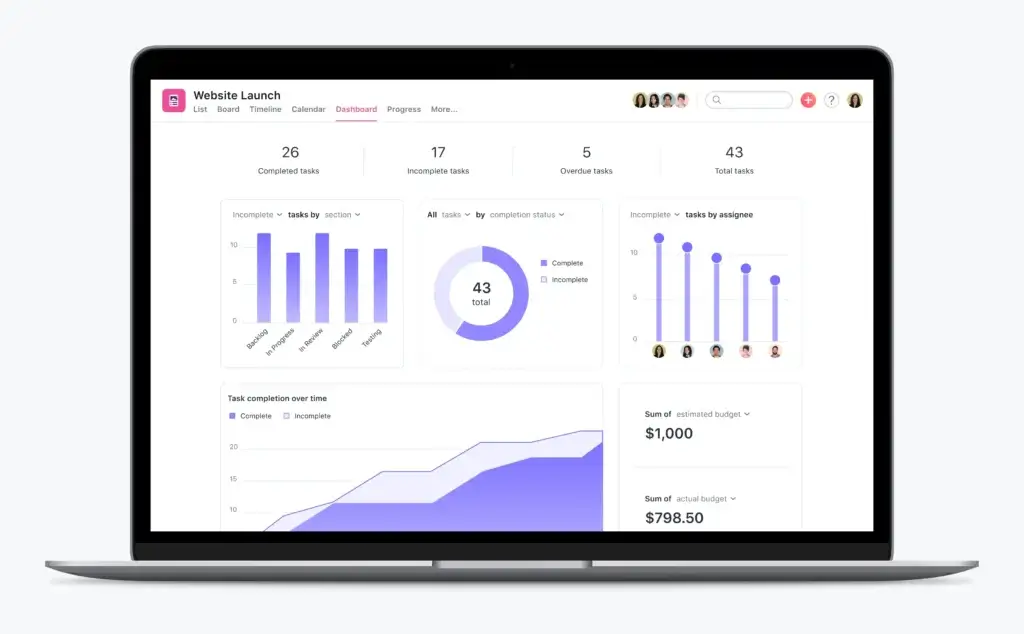
Reporting dashboards show project progress through charts and metrics. Advanced users can group projects into portfolios, connect work to company goals, and monitor workload for a portfolio. These features help project managers move beyond task completion and report on delivery risk, strategic alignment, and resource pressure.
Universal workload and capacity planning require Enterprise, which matters when you need organization-wide resource management.
Time Tracking, Approvals, and Proofing
Asana now includes native time tracking on the Advanced plan, allowing you to compare estimated and actual effort. Advanced also includes approvals and proofing for designs and PDFs, which is useful for marketing and creative production.
A separate Timesheets and Budgets add-on extends cost and billable-rate analysis. Professional-services teams should confirm its price before choosing Asana.
Asana AI Review
AI Studio, AI Teammates, and Asana Dash
Asana’s biggest product shift is its move from conventional project management toward agentic work management. The platform now combines workflow automation, AI agents, priority summaries, and connectors that can turn conversations in external AI tools into structured work.
AI Studio for Repeatable Workflows
Asana AI Studio is a no-code builder for adding AI to repeatable processes. You can use it to classify requests, summarize briefs, set priorities, route work, generate updates, identify missing information, and apply logic inside an operational workflow.
AI Studio works with project context already stored in Asana. Basic access is included with paid plans: Starter receives 50,000 monthly account credits, Advanced 75,000, and Enterprise 200,000.
AI Studio Plus costs $135 per account per month when billed annually and includes 100,000 monthly credits. AI Studio Pro uses custom pricing and is designed for larger, more complex workflows.
AI Teammates for Collaborative Project Work
AI Teammates are agents that can be assigned tasks and participate inside shared projects. They can draft campaign briefs, analyze project context, identify workflow gaps, prepare reports, research information, and help complete multi-step work.
You can create a custom agent without coding or use a prebuilt role. AI Teammates are a paid add-on, so they are not fully included in the normal seat price.
Asana Dash for Daily Prioritization
Asana Dash acts as an AI chief of staff. It analyzes tasks, deadlines, project activity, blockers, and pending decisions to produce a prioritized view of what needs your attention.
A traditional dashboard tells you what happened. Dash is designed to summarize changes, flag stalled work, recommend a next action, and involve an appropriate AI Teammate while keeping final decisions with you. It is available on paid plans where AI Teammates are enabled.
AI Connectors and Data Controls
AI connectors can turn conversations in ChatGPT, Claude, and Gemini into structured projects, assignments, status checks, and risk alerts in Asana.
Asana states that it and its AI partners do not use customer data to train their models. AI Studio and AI Teammates also follow permission controls, which is important when workflows include private projects or sensitive operational data.
Our assessment: Asana’s AI direction is more operational than many basic project management assistants. The main concern is commercial complexity. Basic credits are included, but AI Studio upgrades, AI Teammates, and certain resource-management capabilities can add to the total cost.
Pros and Cons
Advantages and Disadvantages
Positive
✅ Clear task ownership
✅ Strong dependency planning
✅ Flexible workflow automation
✅ Capable AI workflow tools
✅ Portfolio and goal alignment
Negative
❌ Free plan limited to two users
❌ Advanced features are expensive
❌ AI pricing adds complexity
❌ Large workspaces can feel busy
❌ Limited all-in-one document
Asana Pros
✔ Strong project structure: Tasks, subtasks, dependencies, milestones, custom fields, and multiple views support disciplined project execution.
✔ Approachable interface: Teams can begin with simple lists and add automation, reporting, portfolios, and goals as their processes mature.
✔ Useful cross-functional automation: Forms and rules reduce manual intake, routing, reminders, and status updates.
✔ Credible AI workflow direction: AI Studio and AI Teammates can work inside operational processes rather than only generating text.
✔ Good strategic visibility: Advanced and Enterprise features connect individual projects with portfolios, goals, workload, and capacity.
Asana Cons
✘ The free plan is extremely limited: Personal supports only two users, so it is no longer a practical free tier for most small teams.
✘ Advanced planning costs more: Portfolios, goals, workload, native time tracking, formulas, approvals, and proofing require Advanced.
✘ AI costs are difficult to estimate: Included credits, AI Studio upgrades, AI Teammates, and sales-led activation can make the final price less predictable.
✘ Busy environments require governance: Without naming rules, templates, fields, and archiving practices, large workspaces can become difficult to scan.
✘ It is not the broadest all-in-one workspace: ClickUp and Notion offer deeper native document and knowledge-management experiences, while Miro is stronger for visual discovery.
Daily Usability
User Interface and Experience
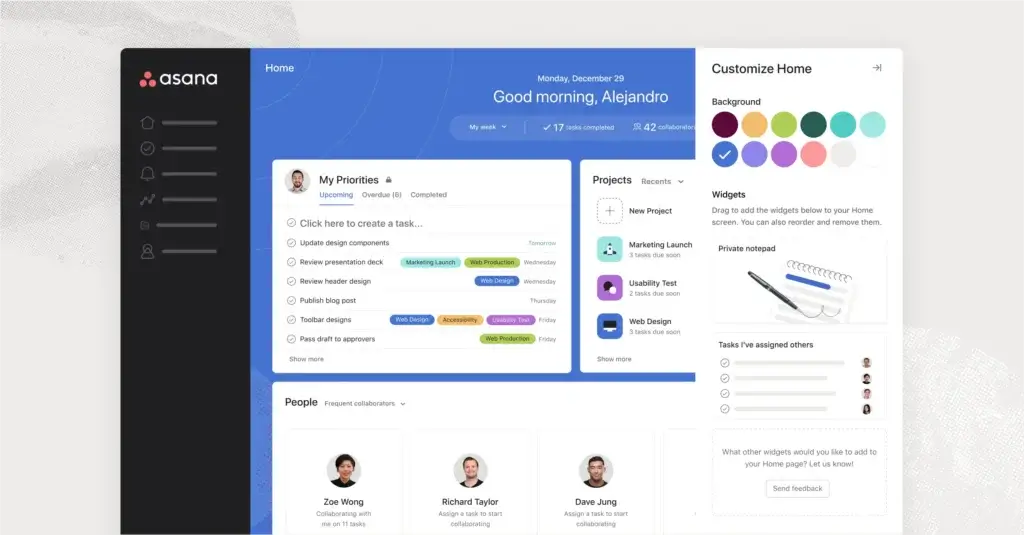
Asana’s interface is one of its strongest qualities. It gives you enough structure to manage serious projects without presenting every advanced control at once. New users can begin with My Tasks and a simple project list, while experienced teams can add custom fields, rules, dashboards, portfolios, and workload views.
Navigation and Daily Planning
The left navigation keeps projects, teams, goals, portfolios, and reporting areas accessible. My Tasks provides a personal execution layer, while Inbox separates project notifications from general communication. This reduces the risk that action items disappear inside chat or email threads.
Quick-add controls are useful, but tasks should still have a project, owner, due date, and relevant reporting fields.
Clarity at Small Scale, Density at Large Scale
Color, spacing, and consistent task layouts make everyday work easy to scan. However, a mature Asana environment can still become dense. Long project lists, excessive notifications, inconsistent custom fields, and duplicated templates can create friction.
Define naming, templates, archiving, permissions, and field governance before expanding across departments.
Collaboration and Accessibility
Comments, mentions, attachments, approvals, and proofing keep feedback connected to the relevant deliverable. Keyboard shortcuts, screen-reader support, contrast options, multiple languages, and mobile apps improve accessibility for distributed teams.
The mobile experience works well for checking tasks, comments, and updates, but detailed project setup, reporting, and dependency planning remain easier on desktop.
Integrations and Compatibility
How Asana Integrates with Other Software
Asana offers hundreds of integrations across communication, storage, development, analytics, CRM, and automation. Focus on reliable data movement, not the size of the app directory.
Communication and Meeting Tools
Slack and Microsoft Teams integrations help turn messages into trackable work and surface project updates inside team communication channels. Zoom and email connections can keep meeting context and follow-up actions attached to the relevant task.
Files, Creative Work, and Approvals
Google Drive, Dropbox, OneDrive, Adobe Creative Cloud, and Figma integrations help teams connect source files with deliverables. This is useful for creative workflows because reviewers can find the asset, discussion, approval status, and deadline in one task.
Development, CRM, and Reporting
Jira and GitHub integrations help connect cross-functional launch work with engineering execution. Salesforce, Tableau, and Power BI support on Advanced improves visibility when project progress needs to be combined with sales or business intelligence data.
Automation Platforms and API Access
Zapier, Make, Power Automate, and Asana’s API cover custom connections. Define which system owns each field before enabling two-way synchronization.
Asana Pricing
Free vs Paid
Asana’s entry price is reasonable, but the plan you need depends on whether you are managing one project or coordinating a portfolio of work. Prices below reflect annual billing.
| Plan | Price | Best for | Important capabilities | Main limitation |
| Personal | Free | Individuals and two-person teams | Unlimited tasks and projects, list, board, and calendar views | Maximum of two users |
| Starter | $10.99/user/month | Teams managing individual projects | Timeline, Gantt, dashboards, forms, custom fields, automations, 50K AI Studio credits | No portfolios, goals, workload, or native time tracking |
| Advanced | $24.99/user/month | Departments and multi-project teams | Portfolios, goals, workload, approvals, proofing, formulas, time tracking, 75K AI Studio credits | High cost for larger teams |
| Enterprise | Custom | Organizations requiring scale and governance | SAML, SCIM, universal workload, capacity planning, workflow bundles, 200K AI Studio credits | Requires sales-led pricing |
| Enterprise+ | Custom | Regulated and security-sensitive organizations | Additional audit, data residency, SIEM, compliance, and governance controls | Custom procurement and deployment |
At annual rates, a 10-person team costs $109.90 per month on Starter and $249.90 per month on Advanced. A 25-person team costs $274.75 on Starter and $624.75 on Advanced. AI Studio Plus, AI Teammates, Timesheets and Budgets, and other add-ons can increase the total.
Best-value plan: Starter is the most practical choice for teams that need professional project planning, dashboards, forms, and automation. Advanced is justified when portfolios, goals, workload, approvals, or native time tracking are essential.
For current details, visit the official Asana pricing page.
Compare with Other Tools
Alternatives to Asana
Asana is not the best fit for every workflow. monday.com is our preferred alternative for most teams because it combines approachable visual work management with strong customization, dashboards, and automation. ClickUp is better when you want to consolidate more productivity tools, while Miro is stronger for visual planning and workshops.
| Criteria | Asana | monday.com | ClickUp | Miro |
| Best for | Structured cross-functional projects and portfolios | Flexible visual work management for most teams | Consolidating tasks, docs, chat, and knowledge | Visual planning, workshops, and product discovery |
| Core strength | Task ownership, dependencies, portfolios, and goals | Custom workflows, dashboards, automations, and adoption | Broad functionality in one workspace | Infinite canvas and collaborative visual workflows |
| AI direction | AI Studio, AI Teammates, Dash, and connectors | AI workflows and agents across customizable work surfaces | AI connected to tasks, Docs, Chat, and dashboards | AI-assisted visual workflows and collaborative ideation |
| Ease of adoption | Clean, but advanced governance takes planning | Strong balance of flexibility and usability | Powerful, but the interface can feel dense | Easy for visual work, but large boards need structure |
| Choose it when | You value disciplined project coordination | You want the best overall balance | You want maximum tool consolidation | You need to align teams visually before execution |
monday.com: Best Overall Asana Alternative
monday.com is the better choice for many teams that want a more visual and adaptable work platform. Its boards, columns, dashboards, automations, forms, and connected products can support project management, operations, CRM, service workflows, and portfolio reporting.
In our view, monday.com offers the strongest balance of usability and customization. It is easier to shape around different departments without forcing every team into the same project structure. Read our full monday.com review.
ClickUp: Best All-in-One Workspace Alternative
ClickUp is a stronger option when you want tasks, documents, chat, whiteboards, goals, dashboards, time tracking, and knowledge features in one workspace. It can provide more functionality for the price, but configuration and adoption often require more discipline.
Choose ClickUp when tool consolidation matters more than interface simplicity. Read our full ClickUp review.
Miro: Best Alternative for Visual Collaboration
Miro is better for brainstorming, workshops, journey mapping, concept development, diagrams, and collaborative planning. It helps teams align on the problem and design the solution before the work becomes a detailed execution plan.
Miro is not always a direct replacement for Asana. Many teams use Miro for discovery and monday.com or another work management platform for delivery. Read our full Miro review.
Our recommendation: Choose Asana for structured cross-functional execution. Choose monday.com for the best overall mix of customization, visual reporting, automation, and team adoption. Choose ClickUp for an all-in-one workspace, and choose Miro when visual collaboration is the central requirement.
Security, Compliance, and AI Governance
What About Security?
Asana provides a mature security and compliance foundation for businesses that manage confidential project information. Data is encrypted in transit and at rest, and the platform maintains certifications and attestations that include SOC 2 Type 2, ISO/IEC 27001, ISO 27017, ISO 27018, ISO 27701, GDPR support, and HIPAA-related controls.
Enterprise plans add SAML authentication, SCIM provisioning, service accounts, guest controls, and organization-wide administration. Enterprise+ extends governance with capabilities such as audit logs, SIEM integrations, managed workspaces, data residency, and additional compliance controls. Enterprise Key Management is available for organizations that require more control over encryption keys.
For AI workflows, Asana states that customer data is not used by Asana or its AI partners to train models. AI Studio and AI Teammates follow controlled permissions, and AI Teammates do not automatically gain access to private work.
Security features do not replace project governance. You still need to control guest access, define who can create integrations, review automation permissions, and avoid placing regulated data in tasks unless your plan and configuration support the relevant compliance requirement.
How Asana Has Changed
The Company and Product Evolution
Founded in 2008 by Dustin Moskovitz and Justin Rosenstein, Asana launched publicly in 2012 and became a public company in 2020.
Asana Product Timeline
✔ 2008: Asana is founded around the idea of making team coordination more transparent.
✔ 2012: The platform launches publicly as a collaborative task-management product.
✔ 2015-2018: Dependencies, boards, and Timeline expand Asana into more formal project planning.
✔ 2020-2022: Portfolios, goals, reporting, and enterprise administration strengthen program-level management.
✔ 2023-2025: Asana adds generative AI, AI Studio, smarter resource management, and collaborative AI Teammates.
✔ 2026: Prebuilt AI Teammates, Asana Dash, AI connectors, reusable automation, and expanded timesheet and budget capabilities move the product toward agentic work management.
Asana is no longer only a task tracker. Its current strategy is to coordinate work between people and AI agents while preserving ownership, permissions, dependencies, and project context. That direction is promising, although buyers now need to evaluate both seat pricing and AI add-on costs.
Conclusion
Final Thoughts
Asana is a strong choice when you need disciplined project execution without the complexity of a technical planning system. It handles ownership, dependencies, forms, automations, dashboards, portfolios, goals, workload, and stakeholder reporting within a consistent interface.
Who Should Use Asana?
Choose Asana when your team manages cross-functional projects with clear deliverables, approvals, and dependencies. It is particularly effective for marketing, operations, product launches, organizational planning, and department-level portfolio management.
Who Should Consider an Alternative?
Consider monday.com when you want a more visual and broadly customizable work platform. Choose ClickUp when you want to replace more tools with one workspace. Choose Miro when workshops, diagrams, and collaborative discovery are more important than detailed task execution.
Overall Rating: 8.3/10
Asana earns a high score for usability, project structure, automation, strategic visibility, and its increasingly capable AI workflow tools. It loses points for the two-user free limit, the cost of Advanced, and the commercial complexity created by AI and resource-management add-ons.
For most teams comparing several platforms, we recommend starting with our best project management software comparison. monday.com is our leading overall recommendation, while Asana remains a strong option for teams that prefer a structured project hierarchy.
Frequently Asked Questions
Have More Questions?
-
Is Asana worth it for small businesses?
Asana can be worth it for small businesses that need structured task ownership, dependencies, forms, dashboards, and repeatable workflows. However, the free plan supports only two users, so most working teams will need Starter. Compare the total team cost with monday.com and ClickUp before choosing an annual plan.
-
How many people can use Asana for free?
Asana Personal supports up to two users. It includes unlimited tasks and projects plus list, board, and calendar views, but it is designed mainly for individuals or two-person teams.
-
Does Asana have native time tracking?
Yes. Native time tracking is included with the Advanced plan, where you can compare estimated and actual time. Personal and Starter users can connect external time-tracking integrations, while broader timesheet and budget capabilities may require an add-on.
-
Is Asana AI included in paid plans?
AI Studio Basic is included with Starter, Advanced, Enterprise, and Enterprise+ plans, subject to monthly account-level credit limits. AI Studio Plus, AI Studio Pro, AI Teammates, and some newer AI experiences may require separate pricing or sales activation.
-
What is the difference between AI Studio and AI Teammates?
AI Studio is a no-code builder for automating repeatable workflows such as intake, routing, prioritization, and updates. AI Teammates are agents that can be assigned collaborative work inside projects, use project context, and complete more complex tasks alongside your team.
-
How much does Asana AI Studio cost?
AI Studio Basic is included with paid Asana plans and has plan-based credit limits. AI Studio Plus costs $135 per account per month when billed annually, while AI Studio Pro uses custom pricing.
-
Is monday.com better than Asana?
monday.com is the better choice for many teams that prioritize visual customization, flexible dashboards, approachable automation, and workflows that extend beyond project management. Asana is stronger when you prefer a more structured task, dependency, portfolio, and goal hierarchy.
-
Is ClickUp a better value than Asana?
ClickUp can offer better value when you want tasks, documents, chat, whiteboards, time tracking, and knowledge features in one workspace. Asana generally feels more focused and consistent, but advanced portfolio, workload, and time-tracking capabilities require its higher-priced Advanced plan.
-
Can Miro replace Asana for project management?
Miro can replace Asana for visual planning, workshops, journey mapping, brainstorming, and early-stage product discovery. It is usually less suitable as the only system for detailed task ownership, recurring operational workflows, dependencies, and portfolio reporting.
-
Does Asana use customer data to train AI models?
Asana states that neither Asana nor its AI partners use customer data to train their models. AI Teammates and AI Studio also use permission controls, and private work must be explicitly accessible before an AI Teammate can use it.