Introduction
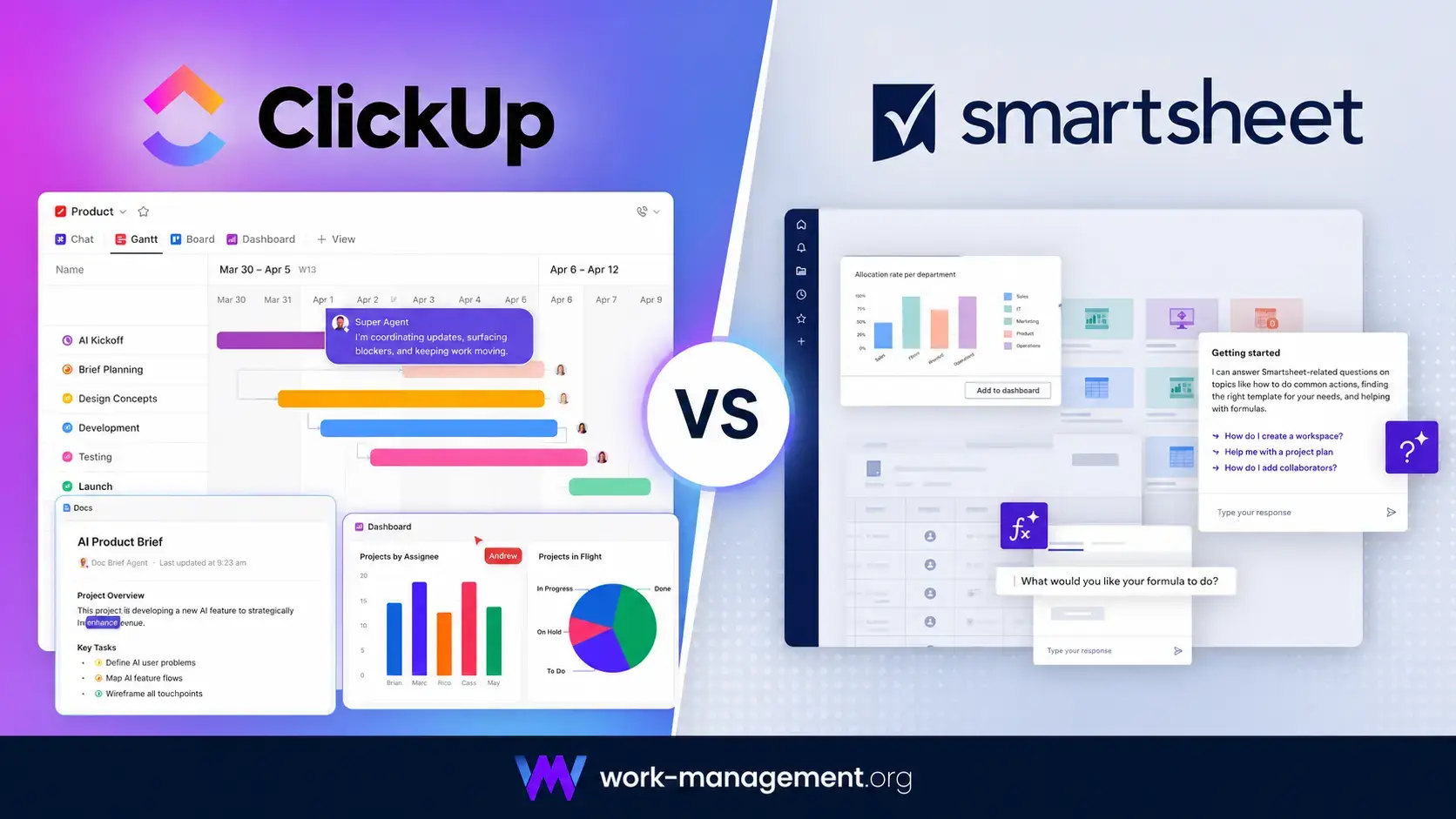
Choosing between ClickUp vs Smartsheet is not simply a matter of comparing two project management feature lists. Both platforms can organize complex projects, automate recurring processes, track resources, and give managers a clearer view of performance. However, they approach work from very different starting points.
ClickUp is the better overall choice for most teams. It brings tasks, documents, chat, whiteboards, dashboards, time tracking, goals, scheduling, and AI into one connected workspace. This makes it particularly valuable when you want to replace several disconnected productivity tools rather than improve an existing spreadsheet-based system.
Smartsheet is the stronger option when your team already thinks in rows, columns, formulas, and structured project plans. It is especially effective for traditional project management, enterprise portfolio governance, data-heavy processes, construction planning, and organizations that need standardized project deployment through tools such as Control Center.
This comparison looks beyond advertised features. You will see how the products differ in daily usability, project structure, AI, automation, reporting, pricing, collaboration, and administration. The goal is to help you understand which platform your team will continue using after the initial implementation is complete.
ClickUp vs Smartsheet at a Glance
If you need a quick recommendation, start with the comparison table below. The detailed sections explain where Smartsheet can outperform ClickUp and why ClickUp still provides the better overall package for most organizations.
| Comparison Area | ClickUp | Smartsheet | Better Choice |
| Overall fit | All-in-one productivity and work management | Spreadsheet-led project and portfolio management | ClickUp |
| Ease of adoption | Modern but feature-dense | Familiar to spreadsheet users | Depends on your team |
| Task management | Deep hierarchy and detailed task controls | Row-based task and schedule management | ClickUp |
| Spreadsheet planning | Capable Table view | Advanced formulas, linking, and hierarchical sheets | Smartsheet |
| Workflow automation | Flexible task and integration automations | Excellent approvals and sheet-based workflows | Close |
| AI capabilities | Brain, multiple models, agents, and desktop AI | Smart Assist, Smart Columns, formulas, and AI dashboards | ClickUp |
| Documents and communication | Docs, Chat, Whiteboards, Clips, and comments | Conversations, attachments, proofing, and sharing | ClickUp |
| Portfolio governance | Portfolios, workload, dashboards, and templates | Control Center and standardized portfolio deployment | Smartsheet |
| Native time tracking | Included with Unlimited | Available through Resource Management | ClickUp |
| Entry pricing | $7 per user/month annually | $9 per member/month annually | ClickUp |
| Enterprise data governance | Strong security and workspace controls | Advanced sharing, egress, and data controls | Smartsheet |
My recommendation: choose ClickUp when you want a flexible project management system that can also replace separate documentation, chat, whiteboarding, and time-tracking tools. Choose Smartsheet when spreadsheet familiarity, traditional scheduling, portfolio standardization, or advanced enterprise data control matters more than having everything in one interface.
How ClickUp and Smartsheet Were Compared
This comparison evaluates both platforms against a realistic cross-functional project: an eight-week product launch with 40 tasks, five phases, task dependencies, creative approvals, budget fields, recurring meetings, external stakeholders, workload reporting, and an executive dashboard.
The assessment prioritizes how much work is required to build the system, how easily contributors can update it, and how reliably managers can use the resulting data. It also considers the cost of replacing or retaining separate tools for documentation, messaging, time tracking, and resource planning.
| Evaluation Category | What Was Considered |
| Adoption | Setup, navigation, onboarding, and contributor usability |
| Project control | Tasks, schedules, dependencies, milestones, and templates |
| Data structure | Hierarchy, formulas, custom fields, relationships, and linking |
| Automation | Rules, approvals, forms, reminders, and integrations |
| Management visibility | Dashboards, workload, portfolios, and executive reporting |
| Collaboration | Comments, documents, chat, files, guests, and proofing |
| Value | Subscription costs, add-ons, implementation, and training |
| Governance | Permissions, security, standardization, and administration |
The evaluation also considers the tool consolidation effect. A lower project management subscription is not necessarily cheaper when you still need separate software for chat, documents, time tracking, whiteboards, and meeting notes.
ClickUp and Smartsheet Platform Overviews
ClickUp
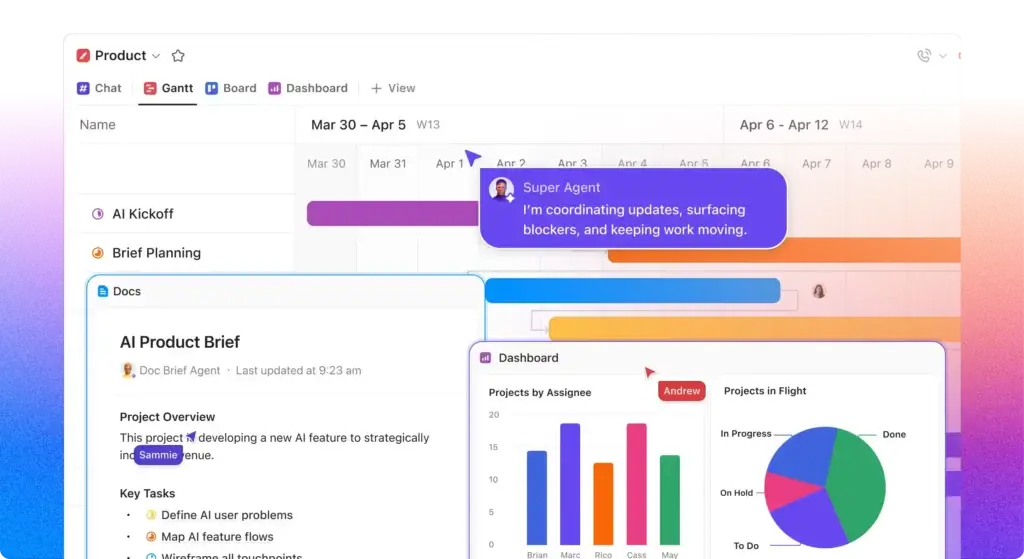
ClickUp is an all-in-one productivity platform built around a hierarchy of Workspaces, Spaces, Folders, Lists, tasks, and subtasks. In addition to project management, it includes Docs, Chat, Whiteboards, Clips, dashboards, goals, forms, time tracking, calendars, and AI tools.
Its main advantage is the amount of connected functionality available within one system. A campaign brief can live in a ClickUp Doc, its deliverables can become tasks, conversations can happen in Chat, time can be recorded against the work, and progress can appear in a dashboard without moving data between several products.
ClickUp Strengths
- Detailed tasks, hierarchy, relationships, and custom fields
- Docs, Chat, Whiteboards, Clips, and time tracking built in
- Competitive Free Forever and Unlimited plans
- Flexible dashboards, views, goals, and resource controls
- Broad AI platform with multiple models and agents
ClickUp Limitations
- Feature density creates a noticeable learning curve
- Poor hierarchy decisions can produce workspace clutter
- Advanced dashboards and workload tools require Business
- Full AI deployment can significantly increase the price
Read the complete ClickUp review for a deeper analysis of its hierarchy, features, plans, and AI capabilities.
Smartsheet

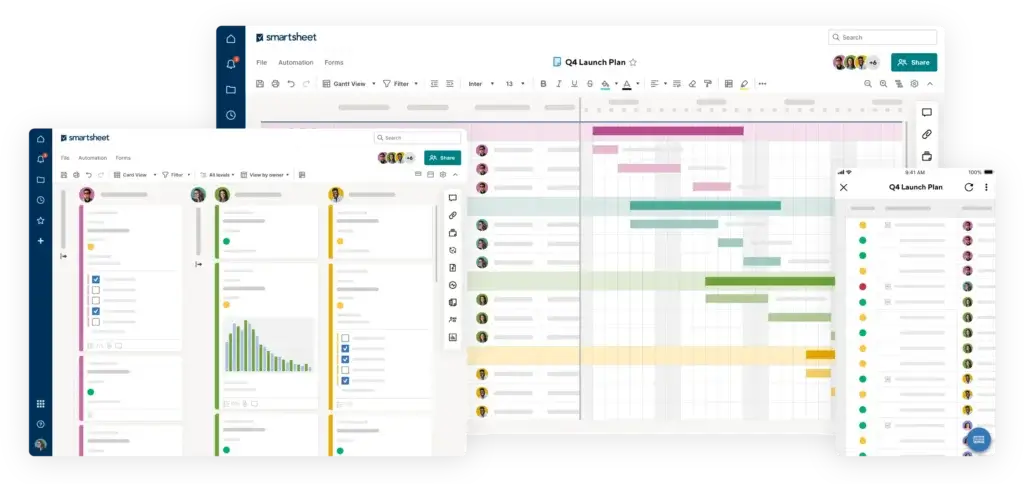
Smartsheet is an intelligent work management platform that combines spreadsheet-style data entry with project scheduling, forms, workflows, reports, dashboards, and enterprise portfolio management.
The product feels familiar to users who already manage work in Excel or Google Sheets. Rows can represent tasks, records, requests, assets, or projects, while columns hold dates, owners, formulas, statuses, and calculated values. The same data can appear in table, Gantt, board, calendar, and timeline views, depending on your plan.
Smartsheet Strengths
- Excellent spreadsheet-style data entry and formulas
- Strong Gantt scheduling, baselines, and critical path controls
- Powerful forms, approvals, reports, and dashboards
- Control Center supports standardized portfolio deployment
- Advanced enterprise sharing and data governance options
Smartsheet Limitations
- Fewer built-in communication and knowledge tools
- Advanced portfolio features sit behind custom-priced packages
- Time tracking requires Resource Management
- Complex formulas and linked sheets can become difficult to maintain
Read the complete Smartsheet review for more detail about its reporting, enterprise capabilities, and ideal use cases.
Ease of Use and Initial Setup
Smartsheet Feels Familiar, but ClickUp Supports More Ways of Working
Starting With Smartsheet
Smartsheet has an immediate advantage for spreadsheet users. Creating columns, entering rows, copying data, and editing multiple records feels similar to working in a traditional spreadsheet. Project managers can also begin with templates for schedules, requests, campaign plans, and portfolio tracking.
The familiarity can be deceptive. Basic data entry is straightforward, but advanced Smartsheet solutions may depend on cross-sheet formulas, reports, helper columns, automations, and linked dashboards. New contributors may understand the grid quickly while administrators still need substantial training to build and maintain the wider system.
Starting With ClickUp
ClickUp requires an early decision about workspace architecture. You need to determine what Spaces, Folders, and Lists represent before importing dozens of projects. A clear structure can make navigation efficient, while an inconsistent structure can create duplicate Lists, custom fields, statuses, and dashboards.
Once the hierarchy is established, ClickUp is more natural for task-oriented work. Contributors can open My Tasks, review priorities, update statuses, comment, and track time without understanding every part of the workspace.
Daily Adoption
Smartsheet is easier when your users already prefer rows and columns. ClickUp is easier when users expect a modern task manager with personal work views, project pages, comments, documents, and chat.
Better choice for spreadsheet-heavy teams: Smartsheet. Better choice for broader day-to-day work management: ClickUp. ClickUp receives the overall advantage because it gives contributors more useful ways to interact with work after the initial setup is complete.
Task and Project Management
ClickUp Provides More Task-Level Depth
Tasks, Subtasks, and Hierarchy
ClickUp treats tasks as detailed work objects. A task can include owners, watchers, priorities, dates, custom statuses, dependencies, checklists, custom fields, relationships, time estimates, tracked time, attachments, comments, and nested subtasks.
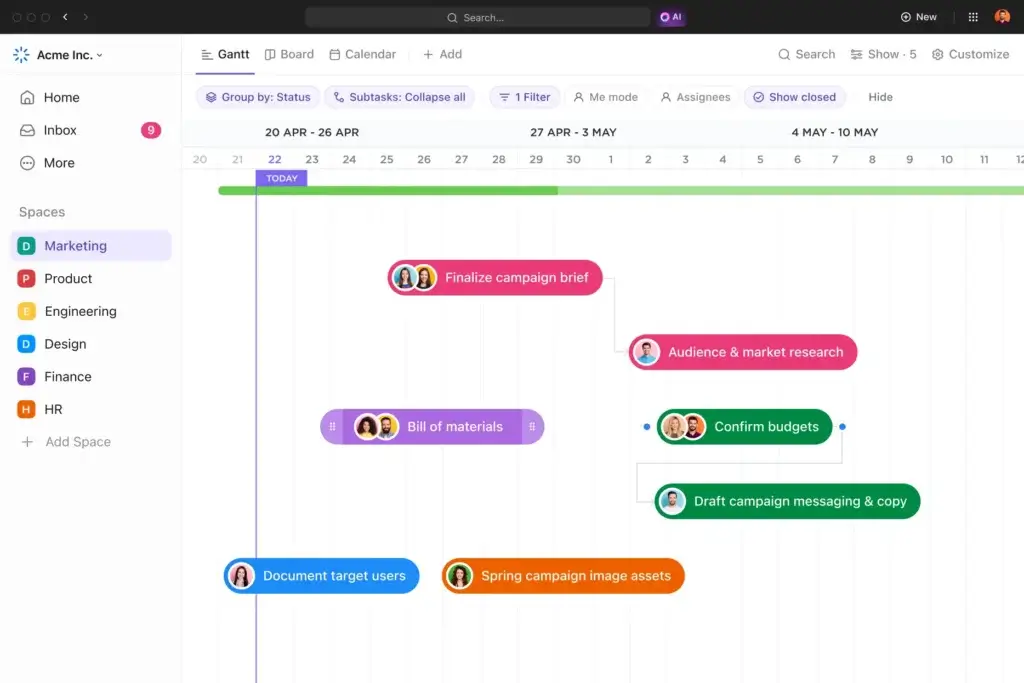
You can organize those tasks within Spaces, Folders, and Lists, then display them through List, Board, Calendar, Gantt, Timeline, Table, Workload, and other views. This makes ClickUp suitable for marketing campaigns, client delivery, software development, product roadmaps, and internal operations.
Smartsheet represents tasks as rows. Hierarchical indentation allows parent and child relationships, while dependencies, milestones, durations, baselines, and critical path tools support structured scheduling. This is effective for traditional project plans, but an individual row does not provide the same depth of connected collaboration as a ClickUp task.
Recurring and Repeatable Projects
Both platforms support templates and recurring processes. ClickUp templates can include tasks, custom fields, views, and automations. Dates can be remapped when a template is applied, helping agencies and operations teams launch the same workflow around a new start date.
Smartsheet templates are strong for structured project sheets, reports, and dashboards. Larger organizations can use Control Center to provision standardized projects from approved blueprints and push controlled changes across a portfolio.
Better choice for detailed task execution: ClickUp. Smartsheet is more attractive for formal schedules and standardized project plans, while ClickUp gives individual contributors and delivery teams a richer task environment.
Spreadsheet Planning and Data Management
Smartsheet Is Better for Spreadsheet-Led Processes
This is the clearest area where Smartsheet is stronger. Its platform is built for teams that need to enter, calculate, link, filter, and report on structured data without moving into a conventional database.
Smartsheet formulas can calculate dates, budgets, completion percentages, health indicators, and other operational metrics. Cell linking and cross-sheet formulas let you aggregate data from multiple sheets, while reports can combine and filter selected records for different audiences.
ClickUp provides a Table view, custom fields, formulas, relationships, rollups, and dashboards. These features are sufficient for most project and operational workflows, but ClickUp still thinks primarily in terms of tasks and work objects rather than cells and sheets.
Smartsheet is particularly useful when your current process depends on a complex Excel workbook and you want to add collaboration, automated reminders, forms, dashboards, and permissions without completely changing the underlying model.
The tradeoff is maintainability. A solution based on dozens of linked sheets, formulas, helper columns, and reports can become dependent on one experienced administrator. Changes should be documented just as carefully as changes to a ClickUp hierarchy.
Better choice for spreadsheet planning and operational data: Smartsheet. ClickUp wins when the objective is managing people and tasks, while Smartsheet wins when the system is closer to a collaborative operational spreadsheet.
Workflow Automation and Forms
Both Are Powerful, but Their Automation Styles Differ
ClickUp Automations
ClickUp automations use triggers, conditions, and actions to update statuses, assign users, modify custom fields, change dates, create tasks, post comments, and connect with external tools. This works well when your process is centered on tasks moving through defined stages.
The Business plan includes 5,000 automations per month and unlocks webhook and automation integrations. Enterprise raises the allowance substantially for larger deployments.
Smartsheet Automated Workflows
Smartsheet is especially strong at approval requests, update requests, reminders, alerts, record movement, and form-driven intake. A form submission can create a row, assign responsibility, trigger an approval, and notify stakeholders without giving every participant direct access to the underlying sheet.
Smartsheet Pro includes 250 automations per month. Business includes unlimited automations, making it attractive for organizations running frequent sheet-based approval and notification processes.
Which Automation System Is Better?
Choose ClickUp when automations need to connect tasks, assignees, statuses, comments, custom fields, and external applications. Choose Smartsheet when the workflow is driven by structured requests, forms, approvals, and row-based records.
Better choice for flexible project automation: ClickUp. Better choice for structured approval workflows: Smartsheet. The overall difference is small, so test your highest-volume process in both platforms before purchasing.
AI Features
ClickUp Has the Broader AI Platform
ClickUp Brain and AI Agents
ClickUp has expanded AI beyond writing assistance. ClickUp Brain can answer questions using workspace context, summarize tasks and Docs, draft content, search across connected information, and work with models from providers such as OpenAI, Anthropic, and Google.
Brain MAX extends the experience to a desktop application with connected search, web research, premium AI models, and talk-to-text. ClickUp also offers AI fields, automations, meeting notes, dashboards, and Super Agents that can perform workflow actions using workspace context.
The main disadvantage is pricing. Brain AI and Everything AI are separate subscriptions, and agent activity can consume AI Super Credits. Teams should estimate usage rather than assuming every AI feature is included in the core project management price.
Smartsheet AI
Smartsheet has made AI more useful inside its spreadsheet model. AI tools can generate formulas, summarize text, analyze data, create charts, populate smart columns, fill forms, and help build dashboards.
Smart Assist adds a conversational interface for asking questions about projects, surfacing risks, creating sheets, and taking actions. Smartsheet also supports MCP-enabled connections that make current work data available to compatible external AI assistants.
Which Has Better AI?
Smartsheet AI is valuable when you want help building formulas, interpreting sheet data, or creating reports without learning every function. ClickUp goes further by connecting AI with tasks, documents, chat, search, meetings, agents, and desktop productivity.
Better choice for AI: ClickUp. Smartsheet offers useful contextual AI and may provide a simpler cost structure for core AI tools, but ClickUp has the broader vision and the stronger range of individual and agentic capabilities.
Collaboration, Documents, and Communication
ClickUp Can Replace More Separate Tools
Smartsheet supports comments, attachments, notifications, proofing, conversations, sharing, and external collaboration. These features are effective when discussion needs to stay connected to a row, sheet, report, or proofing asset.
However, Smartsheet does not attempt to provide the same complete communication and knowledge environment as ClickUp. Many Smartsheet teams continue using Microsoft Teams or Slack for conversations and another platform for long-form documentation.
ClickUp includes collaborative Docs and wikis, real-time Chat, Whiteboards, Clips for screen recording, task comments, proofing, and email inside the workspace. A meeting note can become a Doc, its action items can become tasks, and the related conversation can stay connected to the project.
This consolidation is useful, but it needs governance. Your team should decide whether final decisions belong in Docs, tasks, or Chat. Otherwise, ClickUp can replace app switching with a different problem, too many possible places to store the same information.
Better choice for collaboration and knowledge management: ClickUp. Smartsheet remains effective for contextual project discussion, but ClickUp is the stronger platform for teams that want to reduce dependence on separate collaboration software.
Dashboards, Reporting, and Resource Management
Smartsheet Leads for Formal Portfolio Reporting
Smartsheet dashboards can combine charts, metrics, reports, images, and embedded content into stakeholder-facing views. Reports can gather filtered information from multiple sheets, giving executives a structured view of status, risks, milestones, and ownership.
For enterprise portfolio management, Smartsheet has a meaningful advantage through Control Center. Organizations can standardize project blueprints, automate project provisioning, manage portfolio changes, and aggregate reporting across large numbers of projects.
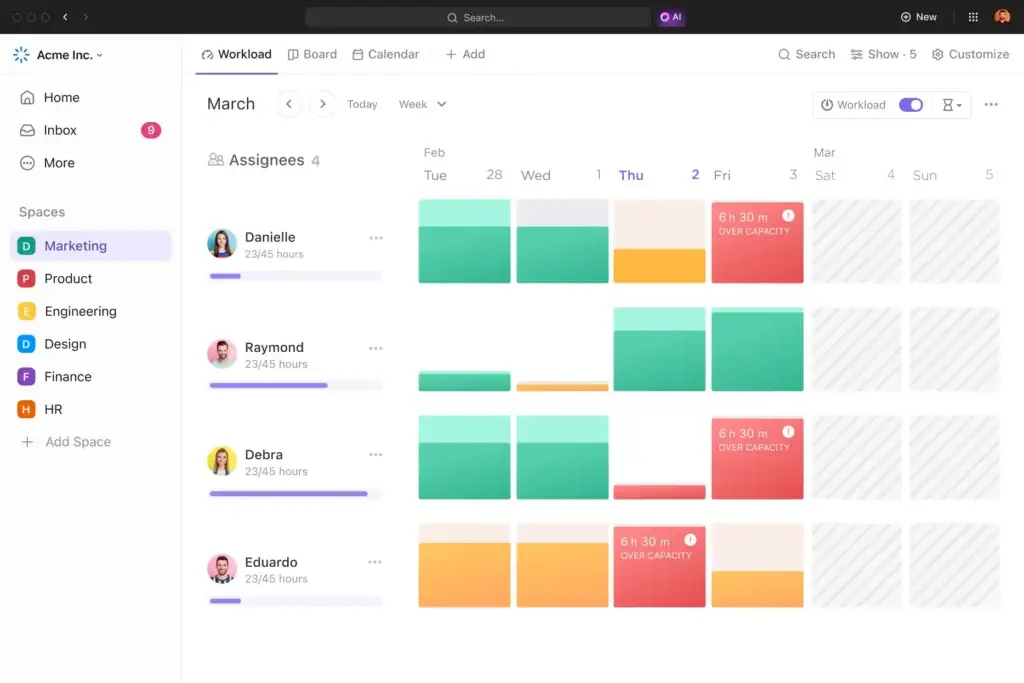
ClickUp dashboards are more accessible to teams on lower-cost plans. They can display tasks, statuses, time, workload, sprint data, goals, and portfolio information. Business adds unlimited dashboards with advanced cards and portfolio workload management.
Resource and Time Management
ClickUp includes native time tracking, resource management, portfolio management, and goals on Unlimited. Business adds more advanced workload reporting. This gives agencies and professional services teams a strong set of delivery tools without purchasing a separate resource management product.
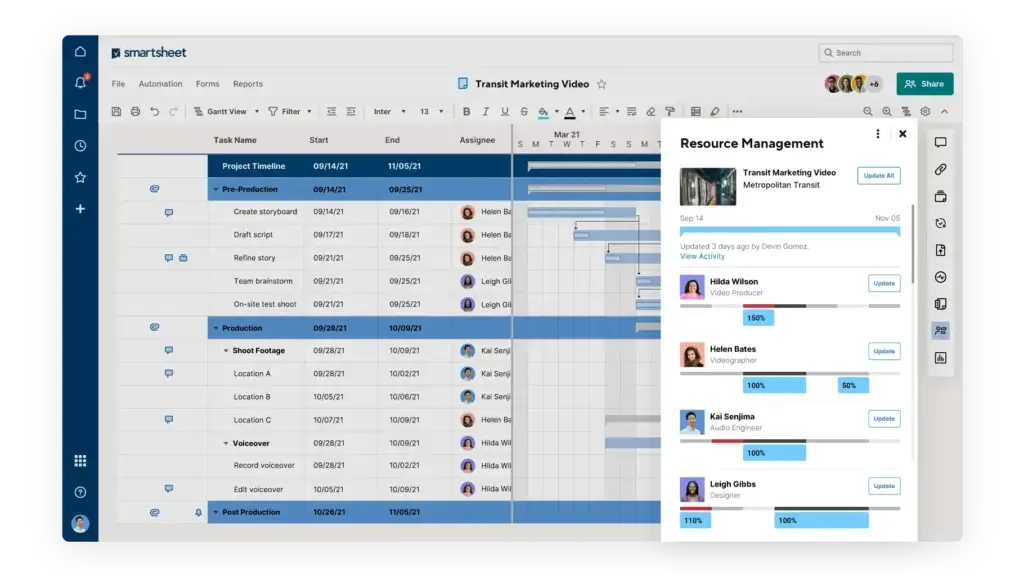
Smartsheet Business includes workload tracking, but more comprehensive capacity planning, project staffing, time entry, expense tracking, and utilization reporting are associated with Resource Management by Smartsheet. This can be powerful, although it increases implementation scope and total cost.
Better choice for enterprise portfolio standardization: Smartsheet. Better choice for affordable dashboards, workload, and time tracking: ClickUp.
Integrations and Extensibility
Both products integrate with common business applications, including Google Workspace, Microsoft 365, Slack, Salesforce, Jira, and cloud storage services. Both also offer APIs and connections through automation platforms.
ClickUp includes unlimited integrations on its Unlimited plan. Its integrations complement an already broad internal feature set, so the platform can act as the center of a technology stack without requiring an integration for every basic productivity function.
Smartsheet has a stronger story for enterprise data movement. Premium capabilities such as Data Shuttle, DataMesh, Connectors, DataTable, and Bridge can synchronize external data, maintain relationships across datasets, and support more controlled operational systems.
Smartsheet Connectors can be particularly valuable for organizations connecting project portfolios with systems such as Salesforce, Jira, and ServiceNow. These capabilities generally sit within higher-tier or custom-priced packages.
Better choice for everyday integrations: ClickUp. Better choice for advanced enterprise data synchronization: Smartsheet.
Pricing and Total Cost
ClickUp is more affordable at the self-service plan level and includes more standalone productivity features. Smartsheet becomes more competitive when unlimited free Contributors or Guests reduce the number of paid members required.
| Plan Level | ClickUp | Smartsheet |
| Free access | Free Forever with unlimited members and feature limits | Free Contributors and Guests depend on the paid plan |
| Entry paid | Unlimited at $7 per user/month annually | Pro at $9 per member/month annually |
| Mid-tier | Business at $12 per user/month annually | Business at $19 per member/month annually |
| Enterprise | Custom pricing | Custom pricing, minimum member requirements apply |
| Advanced portfolio package | Portfolio features included by plan | Advanced Work Management uses custom pricing |
| Native time tracking | Included with Unlimited | Resource Management supports time tracking |
| AI pricing | Brain AI and Everything AI sold separately | Core conversational AI included in current paid plans |
Cost for a 10-Person Team
At published annual prices, 10 users on ClickUp Unlimited cost $70 per month. Ten Smartsheet Pro members cost $90 per month. ClickUp Business costs $120 per month, while Smartsheet Business costs $190 per month.
The products are not exact plan equivalents. Smartsheet Business provides unlimited automations, unlimited Guests and Contributors, timeline views, workload tracking, and administrative capabilities. ClickUp Business provides advanced dashboards, Chat history, proofing, sprint reporting, workload management, and 5,000 monthly automations.
Hidden Costs to Consider
- Implementation and workspace architecture
- Administrator and user training
- AI subscriptions and usage credits
- Resource Management or portfolio add-ons
- Separate chat, documentation, or whiteboard tools
- Migration, formula rebuilding, and data cleanup
- Paid members who only need occasional access
Better choice for pricing and tool consolidation: ClickUp. Smartsheet may remain cost-effective when a small number of members create and manage work for a much larger group of free Contributors or Guests.
Security, Administration, and Enterprise Readiness
ClickUp Enterprise includes SAML SSO, SCIM provisioning, audit logs, session management, custom roles, enterprise API access, permissions, data residency, and optional agreements for regulated use cases.
The main ClickUp governance challenge is structural rather than technical. Organizations need naming standards, approved statuses, custom-field rules, Space ownership, templates, and clear permissions. Without those controls, different departments can build incompatible versions of the same workflow.
Smartsheet offers strong enterprise administration, including SAML-based SSO, directory integrations, activity logs, safe sharing, external collaborator controls, data retention options, event reporting, and regional hosting choices.
Higher-tier Smartsheet packages add particularly granular governance. Dynamic View can expose selected rows and fields without sharing the underlying sheet. Data egress controls can restrict exporting, printing, publishing, and copying sensitive information. Customer-managed encryption keys are also available for organizations with stricter requirements.
Better choice for advanced enterprise data governance: Smartsheet. ClickUp provides a competitive enterprise security package, but Smartsheet has the advantage when controlling the movement and visibility of structured data is the primary concern.
Which Platform Fits Your Team?
Choose ClickUp for Marketing and Creative Teams
ClickUp combines campaign tasks, briefs, calendars, Docs, proofing, Whiteboards, Chat, and dashboards. Marketing teams can move from planning to execution without recreating the same information across several tools.
Choose ClickUp for Agencies and Professional Services
Agencies benefit from client Folders, reusable templates, time estimates, native time tracking, workload views, proofing, Docs, and dashboards. ClickUp Unlimited provides much of this functionality at a relatively low price.
Choose Smartsheet for Construction and Traditional Project Planning
Smartsheet is well suited to schedules, dependencies, critical paths, baselines, field forms, update requests, and stakeholder dashboards. Teams moving from Excel or Microsoft Project may find its model easier to adopt.
Choose Smartsheet for Enterprise PMO Governance
Control Center, Resource Management, Dynamic View, Connectors, Data Shuttle, and portfolio dashboards make Smartsheet a strong option for formal project management offices that need standardized delivery across hundreds of projects.
Choose ClickUp for Product and Software Teams
ClickUp supports sprints, points, backlogs, task types, dependencies, Docs, Whiteboards, goals, and engineering integrations. Smartsheet can manage software projects, but ClickUp provides a more natural task and collaboration model.
Choose ClickUp for Small and Mid-Sized Businesses
ClickUp’s free plan, lower paid pricing, and built-in productivity tools make it the more practical choice for teams that cannot justify a collection of separate subscriptions.
Pros and Cons of ClickUp vs Smartsheet
| Platform | Main Advantages | Main Drawbacks |
| ClickUp | Task depth, built-in tools, AI breadth, time tracking, and lower pricing | Learning curve, setup decisions, workspace clutter, and added AI costs |
| Smartsheet | Spreadsheet planning, Gantt scheduling, reporting, portfolio control, and governance | Fewer collaboration tools, premium add-ons, and complex solution maintenance |
Migrating Between ClickUp and Smartsheet
Moving From Smartsheet to ClickUp
Do not import every sheet directly into a separate ClickUp List. First identify whether each sheet represents a department, project, workflow, database, or report. Then design the ClickUp hierarchy around how people need to find and manage work.
CSV imports can transfer core rows and columns, but cross-sheet formulas, reports, dashboards, automations, and permissions need to be rebuilt. This is also an opportunity to remove helper columns and duplicate sheets that were only required by the previous architecture.
Moving From ClickUp to Smartsheet
ClickUp tasks can be exported and reorganized into Smartsheet rows. However, nested subtasks, Docs, Chat, Whiteboards, Clips, task relationships, and workspace automations do not map directly into a spreadsheet structure.
Before switching, identify which ClickUp functions will require separate replacements. A lower number of core Smartsheet members may not produce savings if the team must purchase additional documentation, communication, time-tracking, or whiteboarding software.
Overall Recommendation
ClickUp is the better choice for most teams comparing ClickUp vs Smartsheet. It provides deeper task management, more built-in collaboration tools, native time tracking, broader AI capabilities, and more competitive self-service pricing.
ClickUp is particularly strong when you want one platform to manage project execution, documentation, communication, planning, and performance. Its main weakness is complexity, so the implementation should begin with a controlled hierarchy, limited statuses, standardized custom fields, and a small number of approved templates.
Smartsheet should not be dismissed as a basic spreadsheet tool. It is the stronger platform for sophisticated sheet-based processes, traditional scheduling, controlled portfolio deployment, advanced data movement, and enterprise governance.
Run the same pilot project in both products before purchasing. Include a workspace administrator, a project manager, two contributors, and an occasional stakeholder. Measure setup time, update completion, reporting quality, and the number of questions users ask about where information belongs.
For most modern marketing, agency, product, software, operations, and small-business teams, ClickUp will deliver more value. For spreadsheet-led PMOs and highly governed enterprise portfolios, Smartsheet may still be the more appropriate investment.
Frequently Asked Questions
-
Is ClickUp better than Smartsheet?
ClickUp is better for most teams because it offers deeper task management, built-in Docs, Chat, Whiteboards, time tracking, and lower self-service pricing. Smartsheet is better for spreadsheet-led planning and enterprise portfolio governance.
-
Is ClickUp or Smartsheet easier to use?
Smartsheet feels easier to spreadsheet users, while ClickUp is more natural for task-oriented teams. Both require administration when you build advanced workflows, reports, or portfolio structures.
-
Is ClickUp cheaper than Smartsheet?
Yes. ClickUp Unlimited starts at $7 per user per month annually, while Smartsheet Pro starts at $9 per member. ClickUp also includes native time tracking and more collaboration tools.
-
Does Smartsheet have a free plan?
Smartsheet focuses on paid Pro, Business, and Enterprise plans, but paid accounts can include free Contributors or Guests depending on the plan. ClickUp offers a standalone Free Forever plan.
-
Which is better for project portfolio management?
Smartsheet is stronger for formal enterprise portfolio governance through Control Center, standardized blueprints, Resource Management, and advanced portfolio reporting. ClickUp provides more affordable portfolio tools for everyday teams.
-
Which has better automation, ClickUp or Smartsheet?
ClickUp is better for task and integration automations. Smartsheet is especially strong for forms, approvals, update requests, notifications, and structured sheet-based processes.
-
Which platform has better AI features?
ClickUp has the broader AI platform, including Brain, premium AI models, desktop tools, search, meeting features, and agents. Smartsheet AI is particularly useful for formulas, data analysis, Smart Columns, and dashboards.
-
Is ClickUp or Smartsheet better for agencies?
ClickUp is generally better for agencies because it combines client projects, reusable templates, native time tracking, proofing, Docs, workload views, and dashboards at a competitive price.
-
Is Smartsheet better than ClickUp for construction?
Smartsheet is often better for construction teams that rely on traditional schedules, Gantt charts, baselines, critical paths, field forms, approvals, and spreadsheet-style project controls.
-
Can you migrate from Smartsheet to ClickUp?
Yes. Smartsheet data can be exported and imported into ClickUp through CSV files. Cross-sheet formulas, dashboards, automations, permissions, and portfolio structures usually need to be rebuilt manually.