Airtable has changed significantly. It is no longer only a spreadsheet-style database. The platform now combines relational data, custom interfaces, automations, portals, AI agents, and an integrated assistant called Omni.
That flexibility suits marketing operations, product planning, content workflows, and other data-heavy processes. However, you may need more setup and administration than with monday.com or ClickUp.
In this Airtable review, you will see how its project management, AI, pricing, security, and collaboration features perform. You will also learn when monday.com, ClickUp, or Miro is likely to fit your team better.
Our assessment: Airtable is one of the strongest tools for building custom, data-driven workflows. For most teams that mainly need project planning, dashboards, workload management, and portfolio visibility, monday.com is the more complete starting point.
Quick Assessment
Airtable Review Summary
Airtable works best when your projects depend on connected records, custom forms, approvals, assets, operational data, or role-specific interfaces. It is less convincing when you want a ready-made project management environment that your team can adopt with minimal configuration.
| Review Area | Assessment |
| Best for | Custom databases, operational workflows, and internal apps |
| Main strength | Flexible relational data and highly configurable interfaces |
| Main limitation | More setup and governance than standard project management tools |
| AI capabilities | Omni, field agents, document analysis, web research, and AI automations |
| Project management fit | Strong for custom systems, less complete out of the box |
| Best overall PM alternative | monday.com |
| Best all-in-one alternative | ClickUp |
| Best visual planning alternative | Miro |
| Overall rating | 7.8/10 |
Platform Overview
What Is Airtable?
Airtable is a cloud platform for building connected workflows and business applications. It began with a familiar spreadsheet-style interface, but its foundation is closer to a relational database because records can be linked across tables.
You can use Airtable as a project tracker, content calendar, product roadmap, lightweight CRM, approval system, asset library, or operations hub. The platform now positions itself around AI-assisted app building, connected data, and agents, rather than simple spreadsheet replacement.
🧩 Relational Data and Linked Records
Linked records are Airtable’s most important differentiator. You can connect projects to tasks, clients, campaigns, budgets, assets, requests, and team members without copying the same information into multiple spreadsheets.
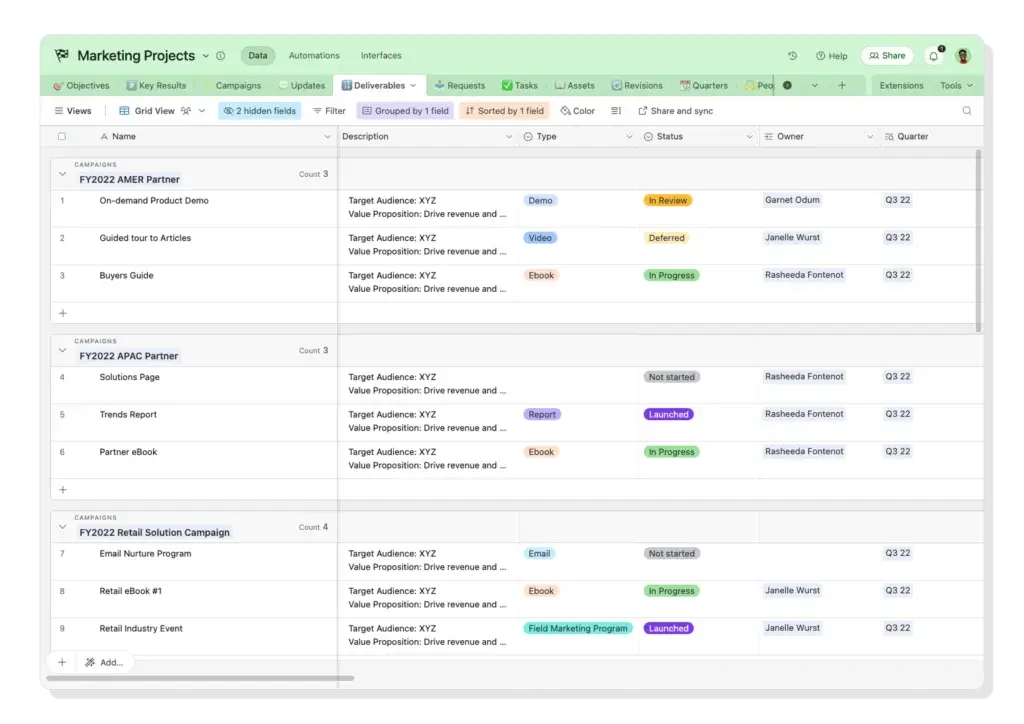
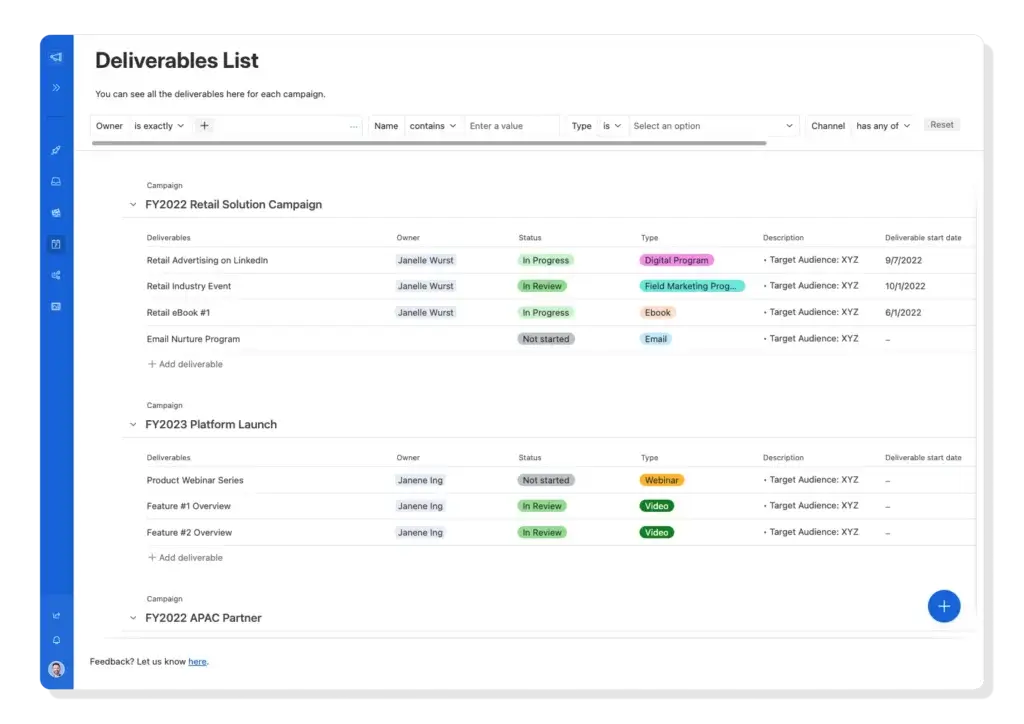
For example, a marketing team can connect every campaign to its deliverables, owners, channels, approvals, costs, and creative assets. When a linked record changes, the update can flow into other views, rollups, dashboards, and interfaces.
📊 Multiple Views of the Same Project Data
Airtable lets you display the same underlying records through grid, kanban, calendar, timeline, Gantt, gallery, and list views. This helps each role work from the format that makes sense without creating separate versions of the project plan.
- Grid and list views: Best for detailed record management and bulk updates.
- Kanban: Useful for stages, status pipelines, and Agile-style work.
- Calendar, timeline, and Gantt: Better for dates, dependencies, and delivery planning.
- Gallery: Useful for creative assets, product catalogs, and visual content.
🎨 Interface Designer
Interface Designer lets you create simplified, role-specific experiences on top of a base. A project manager can build an operational dashboard, while an executive sees portfolio status and a contributor sees only assigned work.
⚙️ Automations and Approvals
You can trigger notifications, create or update records, route approvals, assign owners, schedule recurring actions, and send data to connected services. Airtable also supports scripts and external automation platforms for more complex processes.
🤝 Collaboration and External Portals
Team members can edit records together, comment in context, mention colleagues, review revision history, and receive notifications. Airtable also offers Portals for clients, contractors, vendors, and other external users.
Each portal provides a separate login experience and controlled access to selected interfaces. Portals are a paid add-on, so agencies and client-facing teams should include that cost in their purchasing decision.
AI Capabilities
Airtable AI and Omni
Airtable’s AI capabilities are now a central part of the product. The platform combines an integrated assistant, AI-powered fields, web research, document analysis, generated interface elements, and AI actions inside automations.
What Is Airtable Omni?
Omni is Airtable’s integrated AI assistant. You can use natural-language instructions to build or modify apps, create tables and fields, analyze data, research the web, update records, and answer questions about the information you can access.
For project work, you could ask Omni to build a campaign tracker, create a risk register, summarize delayed deliverables, or design a status dashboard.
AI Field Agents
Field agents can retrieve, analyze, classify, or generate information at the cell level. They are useful for repetitive tasks that would otherwise require manual review or an external AI integration.
- Categorize project risks or incoming requests.
- Summarize status updates and meeting notes.
- Extract deadlines, terms, or owners from documents.
- Research companies, markets, or campaign topics.
- Draft descriptions, briefs, or follow-up messages.
Agent output can feed dashboards, approvals, and later automation steps. Review results that affect budgets, deadlines, compliance, or customers.
AI Credits and Usage
Airtable includes monthly AI credits, but the amount depends on your plan. Credits are pooled across eligible workspace or organization users and reset each billing cycle or month.
Building apps and agents with Omni does not consume credits. Running field agents, asking certain questions, analyzing documents, conducting web research, and generating content can use credits. Airtable’s AI billing documentation explains the current allocation and additional credit packs.
Airtable AI Limitations
AI can reduce setup and repetitive work, but it does not remove the need for a clear data model. If tables, linked records, permissions, and ownership rules are poorly designed, AI may make an inconsistent workflow move faster rather than make it better.
Credit consumption also varies by action, model, input, and output. Teams planning high-volume document analysis or recurring agents should test realistic usage before relying on the included allowance.
Advantages and Limitations
Airtable Pros and Cons
Positive
✅ Flexible relational data
✅ AI-assisted app building
✅ Custom interfaces and views
✅ Strong workflow automation
✅ External collaboration portals
Negative
❌ Requires careful system design
❌ Limited native time tracking
❌ AI usage depends on credits
❌ Weak offline functionality
❌ Costs rise with editors
Airtable’s strongest advantage is the freedom to model work around your data. Its main weakness is that this freedom creates design and administration work that simpler project management platforms handle for you.
✅ Where Airtable Performs Well
- Relational workflow design: You can connect projects, people, assets, requests, and budgets in one system.
- AI-assisted app building: Omni can accelerate base creation, formulas, interfaces, research, and record updates.
- Role-specific interfaces: Different teams can work from simplified views of the same connected data.
- Flexible automations: Native actions, scripts, APIs, and third-party tools support complex workflows.
- External collaboration: Portals extend controlled interfaces to clients, vendors, and contractors.
❌ Where Airtable Falls Short
- System design burden: Someone must decide how tables, fields, links, permissions, and automations should work.
- Limited native time tracking: You may need custom fields, forms, extensions, or another tool for detailed time capture.
- Credit-based AI: Heavy AI workflows can require additional credit packs.
- Mobile and offline limitations: Complex interfaces and configuration work are better suited to desktop use, and offline work is limited.
- Editor-based pricing: Costs rise when many people need permission to change records.
Airtable can scale to substantial enterprise use cases, but performance still depends on your plan, base architecture, formulas, linked records, automation volume, and interface complexity. Test with realistic data rather than assuming every prototype will scale unchanged.
Planning and Execution
Airtable for Project Management
Airtable can support project management, but you usually build the process yourself. That makes it suitable for teams with unusual data relationships or operational requirements, while teams seeking standard project execution may prefer a dedicated platform.
📌 Tasks, Milestones, and Dependencies
You can create tasks with owners, priorities, dates, statuses, milestones, attachments, and linked deliverables. Timeline and Gantt views can represent dependencies and make scheduling easier.
The limitation is not capability, but setup. Airtable does not always guide you toward a consistent project structure, so templates, naming rules, required fields, and status definitions become important as more teams join.
🗂️ Portfolio and Cross-Project Visibility
Linked records, rollups, synced data, and interfaces can support project portfolios. You can aggregate status, budget, risk, ownership, and delivery information across multiple projects.
However, portfolio reporting requires deliberate architecture. monday.com provides a more direct project-to-portfolio path, with purpose-built dashboards, resource views, dependencies, milestones, and portfolio reporting.
👥 Resource and Capacity Planning
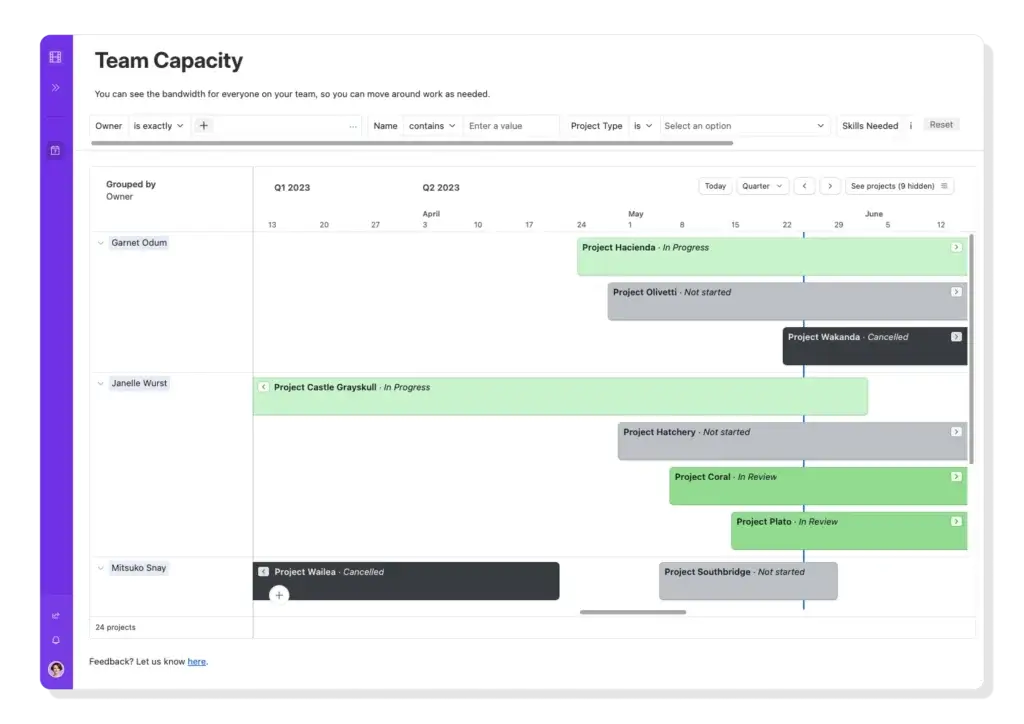
Airtable can model availability, assignments, skills, workload, and utilization by linking people to projects and time periods. The timeline interface shown below demonstrates how projects can be organized by owner across dates.
This approach is flexible, but you may need formulas, linked tables, and custom interfaces to make capacity information dependable. monday.com is easier when you want workload and portfolio-level resource management with less configuration.
⏱️ Time Tracking, Budgets, and Reporting
Airtable can store estimated hours, actual hours, hourly rates, planned budgets, vendor costs, and project expenses. It can also calculate totals through formulas and rollups.
Airtable includes a Time Tracker extension, but time capture is less central to the product than it is in dedicated project and client-work platforms. ClickUp provides more ready-made time tracking, while monday.com offers stronger visual reporting for general project and portfolio oversight.
User Experience
What Airtable Is Like to Use
Airtable is easy to start and more difficult to standardize. You can import a spreadsheet, apply a template, add fields, and switch views quickly. The deeper learning curve appears when you need to design a dependable system for several teams.
Clean Interface and Familiar Data Entry
The grid feels familiar to spreadsheet users, while color-coded fields, drag-and-drop controls, filters, grouping, and saved views make records easier to organize. New users can usually understand basic editing without extensive training.
The Hidden Architecture Learning Curve
The harder part is deciding which tables should exist, how records should connect, who can edit each field, and how automations should behave. A poorly structured base can become as difficult to maintain as the spreadsheets it replaced.
Growing teams often benefit from assigning an Airtable owner who manages templates, permissions, naming standards, automation documentation, and change requests.
Interfaces Improve Adoption
Role-specific interfaces can hide unnecessary fields and give contributors a focused experience. This is particularly useful when managers need full data access but occasional users only need to submit requests, approve work, or update status.
Mobile and Offline Experience
The mobile apps are suitable for reviewing records, adding updates, and handling basic collaboration. Advanced building, complex interfaces, and automation configuration are more practical on desktop.
Airtable is also primarily an online platform. Teams working at construction sites, field locations, or areas with unreliable connectivity should test their required workflows before adoption.
Connected Workflows
Airtable Integrations
Airtable connects with business tools through native integrations, synced data, automations, extensions, APIs, webhooks, and scripting. The important question is not only whether a connection exists, but whether it supports the direction and frequency of data movement you need.
🔗 Common Integration Categories
- Communication: Slack and Microsoft Teams notifications or workflow updates.
- Files and productivity: Google Drive, Box, Dropbox, and Google Workspace services.
- Development and support: Jira, GitHub, and Zendesk workflows.
- CRM and enterprise data: Salesforce and other connected data sources.
- Automation: Zapier, Make, Workato, and Airtable’s native automation actions.
- Custom systems: Airtable API, webhooks, scripts, and custom extensions.
Before implementation, confirm whether an integration is native, one-way, two-way, scheduled, or dependent on a third-party service. This prevents teams from assuming that every listed connection provides real-time synchronization.
Best Airtable Alternatives
monday.com, ClickUp, and Miro
Airtable is strongest when you need to build a system around connected data. The alternatives below are better when your priority is ready-made project execution, workspace consolidation, or visual collaboration.
| Platform | Best For | Main Advantage Over Airtable | Main Trade-Off |
| Airtable | Custom data-driven workflows | Relational records and flexible app building | Requires more setup and governance |
| monday.com | Complete visual project management | Faster setup, dashboards, portfolios, and resource planning | Less database-oriented |
| ClickUp | All-in-one productivity workspace | Tasks, docs, goals, time tracking, and collaboration in one tool | Feature density can feel crowded |
| Miro | Visual planning and workshops | Superior whiteboarding, mapping, and ideation | Not a relational operational database |
1. monday.com: Best Overall Airtable Alternative for Project Management
monday.com is the stronger choice when your main goal is managing projects rather than building a custom database application. It gives you boards, dependencies, milestones, timelines, Gantt charts, dashboards, portfolio visibility, automations, workload planning, and resource management in a more guided structure.
Airtable can reproduce many similar workflows, but monday.com generally requires less architecture and is easier to standardize across non-technical teams.
Read our complete monday.com review for a deeper look at its features, pricing, and business fit.
2. ClickUp: Best for an All-in-One Workspace
ClickUp is better suited to teams that want tasks, documents, goals, dashboards, time tracking, communication, whiteboards, and project planning inside one configurable workspace.
Airtable gives you more freedom to design relational data structures. ClickUp provides more project management functionality before customization, although its interface can feel busy.
See our ClickUp review for a detailed assessment.
3. Miro: Best for Visual Planning and Workshops
Miro is the better option for discovery workshops, process mapping, customer journeys, brainstorming, retrospectives, concept maps, and visual project planning.
Airtable is stronger after information needs to become structured records and operational workflows. Many teams use Miro during exploration, then move approved plans into monday.com, ClickUp, or Airtable for execution.
🎯 Which Tool Should You Choose?
- Choose Airtable for connected records, custom forms, operational data, and internal apps.
- Choose monday.com for the best overall balance of project planning, dashboards, portfolios, and resource management.
- Choose ClickUp when you want to consolidate tasks, docs, goals, time tracking, and team collaboration.
- Choose Miro when workshops, diagrams, and visual thinking are central to your process.
Compare more options in our guide to the best project management software.
Plans and AI Credits
Airtable Pricing: What You Actually Pay
Airtable offers Free, Team, Business, and Enterprise Scale plans. Team costs $20 per user per month when billed annually, Business costs $45 per user per month when billed annually, and Enterprise Scale uses custom pricing.
On Team and Business plans, users with edit permissions are generally billable. Read-only collaborators, form submissions, and public share links do not create standard editor charges. This distinction can materially affect cost as your workspace grows.
Every plan includes monthly AI credits. Current allocations include 500 credits per eligible Free editor, 15,000 per Team billable collaborator, 20,000 per paid Business user, and 25,000 per Enterprise Scale paid user at list price. Credits are pooled, and additional packs are available for eligible paid plans.
| Plan | Annual Price | Included AI Credits | Best For |
| Free | $0 | 500 per eligible editor/month | Individuals and lightweight testing |
| Team | $20/user/month | 15,000 per billable collaborator/month | Small and growing teams |
| Business | $45/user/month | 20,000 per paid user/month | Departments needing administration and scale |
| Enterprise Scale | Custom | 25,000 per paid user/month at list price | Large organizations needing governance and advanced scale |
Additional cost to consider: Airtable Portals is an add-on. It currently starts at $120 per month for 15 portal seats on Team and $150 per month for 15 seats on Business, with custom pricing for Enterprise Scale.
Review the official Airtable pricing page before purchase because plan limits, AI allowances, and add-on pricing can change.
Data Protection
Airtable Security and Compliance
Airtable encrypts content in transit with 256-bit SSL/TLS and at rest with 256-bit AES encryption. Production data is backed up to a separate, isolated location, and backups are encrypted.
Access and Administration
- Custom collaborator and workspace permissions.
- Two-factor authentication for password-based accounts.
- Password-protected or domain-restricted shared views.
- Record-level revision history and activity tracking.
- SAML-based single sign-on and additional enterprise administration.
Compliance
Airtable lists SOC 2 Type 2, ISO/IEC 27001, ISO/IEC 27701, GDPR-related privacy controls, HIPAA support information, and TX-RAMP Level 2 among its trust and compliance resources.
Security requirements differ by industry and plan. Review Airtable’s Trust and Security information, confirm which controls are included in your plan, and complete your own legal and compliance assessment before storing regulated data.
Company and Product Evolution
How Airtable Has Changed
Airtable’s product evolution is more relevant to buyers than its funding history. The platform has moved through four clear stages:
- Spreadsheet-style database: Flexible tables made structured data approachable to non-developers.
- No-code workflow platform: Automations, linked records, synced data, and extensions supported broader operations.
- Interface and app builder: Teams could create role-specific applications on top of shared data.
- AI app and agent platform: Omni, field agents, generated interface elements, document analysis, and web research now sit inside workflows.
Airtable also promotes enterprise data scaling through HyperDB, which can support very large datasets in qualifying configurations. This broadens the platform’s reach, but standard teams should still evaluate plan limits, architecture, and real-world performance before committing mission-critical processes.
Airtable now overlaps with no-code development, workflow automation, internal apps, AI agents, and project management software.
Conclusion
Is Airtable Worth It?
Airtable is worth considering when you need connected data, custom interfaces, record-based automation, or internal apps without conventional development.
It is less compelling when your main requirement is straightforward project execution. Airtable can manage tasks, timelines, dependencies, resources, and portfolios, but you often need to design those systems before your team can use them effectively.
✅ Choose Airtable If
- Your workflows depend on linked data across projects, clients, campaigns, assets, or requests.
- You want to build internal applications and role-specific interfaces.
- You have someone who can own structure, permissions, automation, and governance.
- You want AI agents to analyze or enrich structured operational records.
❓ Consider an Alternative If
- You want project management features ready to use with less configuration.
- You need stronger native time tracking, workload planning, or portfolio reporting.
- Your team works mainly through visual workshops and collaborative diagrams.
- Reliable offline access is a core requirement.
For most project-focused teams, monday.com is our preferred overall recommendation. It provides a clearer path from setup to execution with boards, dashboards, portfolios, automations, and resource management.
Choose ClickUp when you want more tools inside one workspace. Choose Miro when brainstorming, mapping, and visual alignment matter more than relational operational data.
⭐ Overall Rating: 7.4/10
Airtable is an excellent custom workflow and AI app-building platform. It can also manage projects effectively, but it is best for teams willing to design and maintain their own system rather than those seeking a complete project management process from day one.
FAQs
Frequently Asked Questions
-
Is Airtable good for project management?
Yes, especially when your projects depend on connected records, forms, assets, approvals, or custom workflows. Teams wanting ready-made portfolio, workload, and reporting features may find monday.com easier to deploy.
-
Does Airtable include AI features?
Yes. Airtable includes Omni, AI field agents, document analysis, web research, AI-generated content, and AI actions inside automations. Most active AI actions consume monthly credits.
-
How many AI credits does Airtable include?
Current monthly allocations include 500 credits per eligible Free editor, 15,000 per Team billable collaborator, 20,000 per paid Business user, and 25,000 per Enterprise Scale paid user at list price.
-
Is Airtable better than monday.com?
Airtable is better for relational data and custom internal applications. monday.com is usually better for teams that want project planning, dashboards, portfolios, and resource management with less setup.
-
Does Airtable have Gantt charts and dependencies?
Yes. Airtable supports Gantt and timeline views, and you can model dependencies between records. The quality of the schedule depends on how your dates, milestones, and linked tasks are configured.
-
Does Airtable have native time tracking?
Airtable offers a Time Tracker extension and can calculate logged durations. More advanced timesheets, idle detection, billable-hour controls, and reporting may still require custom design or another tool.
-
Can Airtable be used as a client portal?
Yes. Airtable Portals lets you share selected interfaces with clients, vendors, and contractors through separate guest logins. Portals is a paid add-on with seat-based packages.
-
Can Airtable handle large datasets?
Airtable supports substantial enterprise datasets, including HyperDB configurations promoted for very large tables. Performance still depends on your plan, base design, formulas, links, automations, and interface complexity.
-
Is Airtable free?
Yes. Airtable has a Free plan for individuals and lightweight use. Paid Team, Business, and Enterprise Scale plans add capacity, administration, AI credits, and advanced workflow features.
-
How is Airtable different from Google Sheets?
Google Sheets is primarily a spreadsheet. Airtable adds relational linked records, multiple operational views, role-specific interfaces, automations, permissions, portals, and AI agents for structured workflows.