
Introduction
If you are looking for a team messaging platform that does not drain your software budget, Pumble is one of the first tools worth testing. In this Pumble review, you will see whether it is still one of the strongest free Slack alternatives for small teams, remote teams, startups, nonprofits, and growing businesses.
Pumble stands out because it gives you unlimited users and unlimited message history on the free plan. That matters more than it may seem at first. Many teams start with a free chat tool, only to discover later that old messages, files, or search history become limited unless they upgrade.
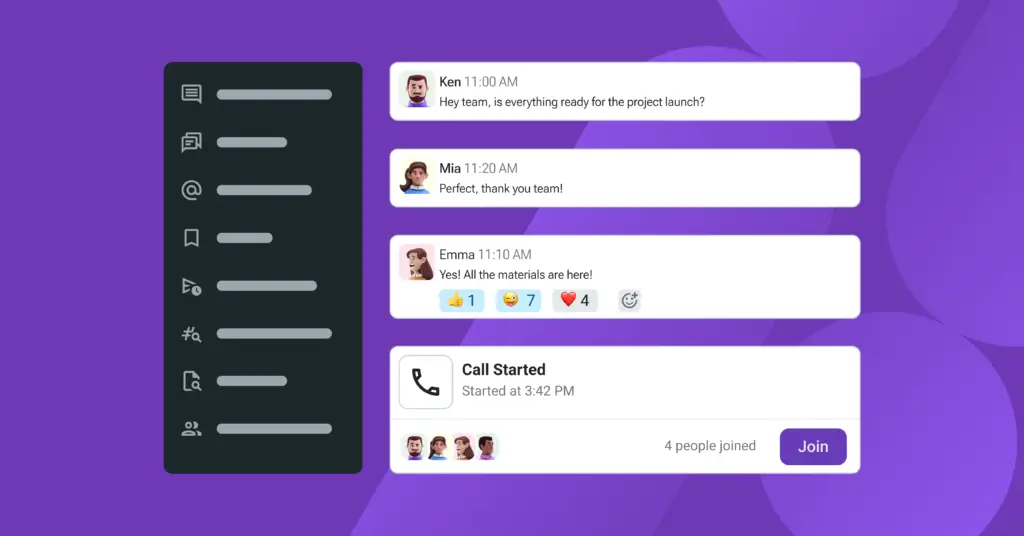
With Pumble, the promise is simple: business chat, channels, direct messages, file sharing, voice calls, video calls, and a clean Slack-like interface without the same pricing pressure.
However, Pumble is not perfect. It has a smaller native integration ecosystem than Slack, group meetings require a paid plan, and it is not designed to replace a full project management platform like ClickUp, monday.com, Asana, or Plaky.
This review covers the most important details before you decide:
- Pumble’s main features for team communication
- What you get on the free plan
- Pumble pricing and paid plan differences
- Integrations, AI Assistant, MCP, security, and admin controls
- Pumble vs Slack, ClickUp Chat, Zenzap, and other alternatives
Quick answer: Pumble is a strong choice if you want a simple, affordable, and easy-to-use team chat app with unlimited message history. It is best for teams that need reliable internal communication more than advanced workflow automation or a massive app marketplace.
Overview
What is Pumble?
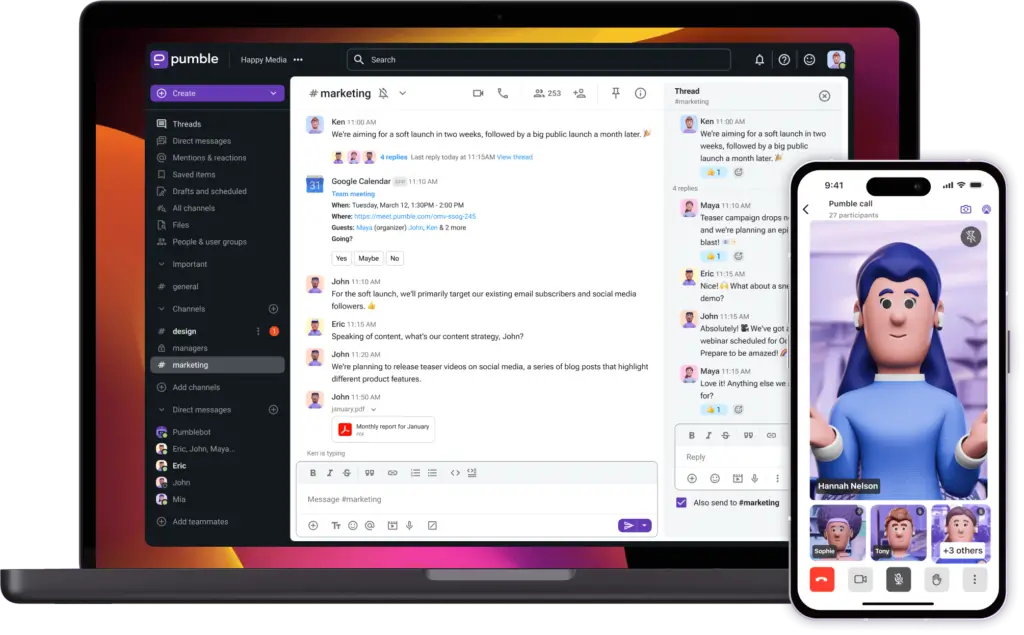
Pumble is a business communication platform developed by CAKE.com. It helps teams organize conversations through channels, direct messages, threads, file sharing, calls, and meetings.
At its core, Pumble is a Slack-style team chat app. The difference is that Pumble is much more generous on its free plan. You can invite unlimited users, keep unlimited message history, create unlimited channels, and use 1:1 voice and video meetings without paying.
That makes it especially useful for teams that want to centralize communication but do not want to pay per user immediately.
Who is Pumble best for?
Pumble is best suited for teams that need lightweight, affordable, and organized communication.
- Startups that want a free Slack alternative
- Remote teams that need structured channels and DMs
- Small businesses that want predictable chat software pricing
- Nonprofits and education teams with limited budgets
- Agencies that need fast internal communication
- Teams switching from Slack but not needing Slack’s full app ecosystem
Pumble is less suitable if your team needs a fully native AI work hub, native project management, or hundreds of plug-and-play integrations.
Pumble at a glance
| Category | Pumble Details |
| Software type | Team communication and business chat app |
| Best for | Small teams, startups, remote teams, nonprofits, and budget-conscious businesses |
| Free plan | Yes, with unlimited users and unlimited message history |
| Starting paid price | $2.49 per user/month when billed annually |
| Main strength | Generous free plan and simple Slack-like experience |
| Main limitation | Smaller native integration ecosystem than Slack |
| Best alternative for integrations | Slack |
| Best alternative for project work | ClickUp Chat or Zenzap |
Software Specification
Pumble's Core Features
Pumble focuses on the essentials of team communication: channels, messages, calls, files, search, and notifications. It does not try to become a full work operating system, which is part of its appeal.
The interface is familiar, fast, and easy to understand. If your team has used Slack, Microsoft Teams, Discord, or any modern chat app, onboarding should feel straightforward.
Messaging and channels
Messaging is Pumble’s strongest area. You can create public channels for company-wide discussions, private channels for sensitive projects, and direct messages for one-on-one communication.
The biggest advantage is unlimited message history. On many free chat tools, older conversations become unavailable or harder to search unless you upgrade. Pumble avoids that problem, which makes it especially valuable for long-term knowledge sharing.
Inside Pumble, you can:
- Create public and private channels for teams and projects
- Use direct messages for one-on-one conversations
- Reply in threads to keep discussions organized
- Mention teammates with @mentions
- Pin important messages for faster access
- Schedule messages for future delivery
- Use reactions to acknowledge updates quickly
For most teams, this covers the daily communication workflow well. You can separate departments, clients, projects, announcements, support discussions, and leadership updates without making the workspace feel crowded.
Voice and video calls
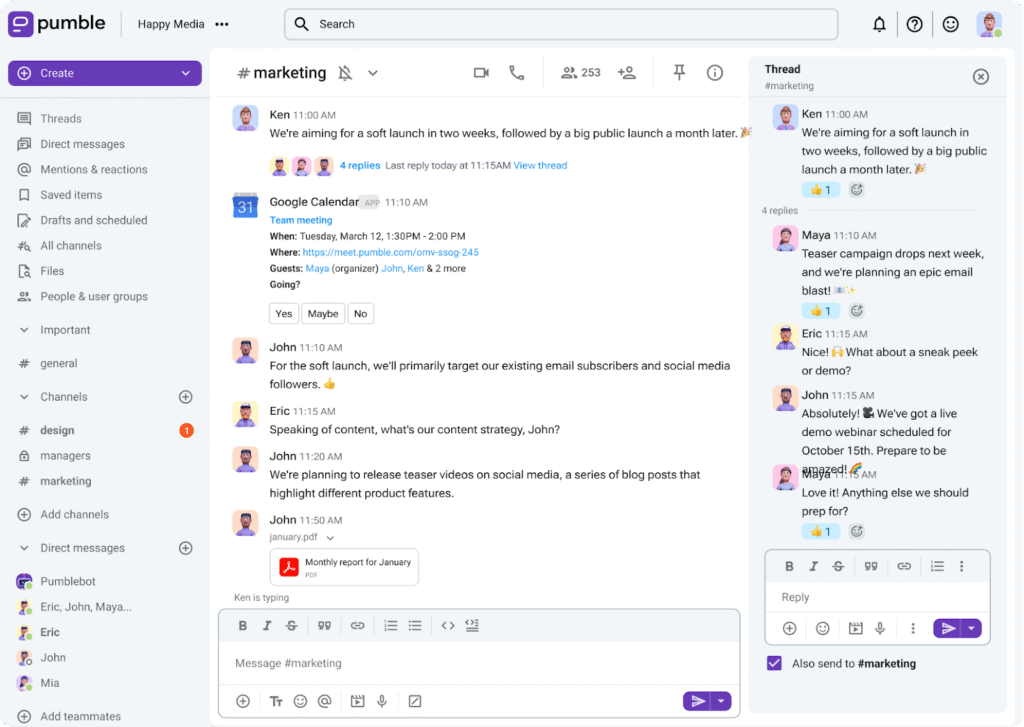
Pumble includes 1:1 audio and video calls on the free plan. This is useful for quick check-ins, internal support, manager conversations, and remote collaboration.
For group meetings, screen sharing, and more advanced meeting workflows, you will need a paid plan. The Pro plan is the first practical upgrade if your team needs regular team meetings inside Pumble.
For small remote teams, this is enough to reduce the need for separate meeting tools in many day-to-day situations. However, Pumble is still not a direct replacement for Zoom, Google Meet, or Microsoft Teams if your company runs large webinars, formal client calls, or complex meeting setups.
File sharing and storage
Pumble lets you share documents, images, PDFs, spreadsheets, and other files directly in conversations. This is useful when your team needs to attach context to a discussion instead of jumping between email, cloud storage, and chat.
The free plan includes 10GB of storage for the workspace. Paid plans increase storage depending on the tier, with Enterprise offering the most room for larger teams that share files heavily.
| Plan | Storage | Best For |
| Free | 10GB per workspace | Light file sharing and small teams |
| Pro | 10GB per seat | Growing teams with regular file sharing |
| Business | 20GB per seat | Teams sharing more documents and recordings |
| Enterprise | 100GB per seat | Larger teams with heavier storage needs |
Search, notifications, and productivity tools
A team chat app is only useful if people can find what they need later. Pumble’s unlimited message history makes search more valuable because older conversations remain accessible.
You can search through messages, channels, and files, which helps your chat workspace become a lightweight knowledge base over time.
Notifications are also easy to manage. You can use mentions, channel notifications, and mobile push notifications to stay informed without checking every channel manually.
Cross-platform apps
Pumble is available across desktop, mobile, and web. You can use it on Windows, macOS, Linux, iOS, Android, and your browser.
The cross-platform experience is important for hybrid and remote teams because not everyone communicates from the same device. Some people work from desktop, others reply from mobile, and managers often switch between both during the day.
In practical use, Pumble feels lightweight compared to heavier collaboration suites. That makes it a good option if your team wants a focused communication tool rather than another complex platform.
Slack import
Pumble includes a Slack import option, which is useful if you are moving from Slack and want to reduce switching friction. This matters because migration is often the reason teams stay with an expensive tool longer than they should.
If your team has years of Slack usage, you should still review what will transfer before you commit. But for many small businesses, the Slack import feature makes the transition easier.
Integrations and API
Pumble’s integration ecosystem is still smaller than Slack’s, but it has expanded beyond the basics. This is important because earlier reviews often framed Pumble as a simple chat app with limited integrations. That is still partly true compared with Slack, but Pumble now covers more of the everyday workflows you would expect in a business communication tool.
You can connect Pumble with productivity, development, support, automation, and CAKE.com tools. Current integration options include Google Calendar, Google Drive, Outlook Calendar, GitHub, GitLab via webhooks, Jira, Zendesk, Zoom, Gmail, RSS, Zapier, email workflows, webhooks, API-based custom connections, and CAKE.com tools such as Clockify and Plaky.
The key detail is that Clockify and Plaky are native Pumble integrations and do not count toward the standard integration limits. That makes the free plan more useful if your team already uses CAKE.com’s time tracking or project management apps.
| Integration Category | Examples | What It Means for Your Team |
| CAKE.com native tools | Clockify, Plaky | Connect communication with time tracking and project work without using integration slots |
| AI and automation | AI Assistant, MCP Server, Zapier, webhooks, API | Useful for AI-assisted knowledge lookup, summaries, alerts, and custom workflows |
| Developer workflows | GitHub, GitLab, Jira | Helps product and engineering teams receive updates in channels |
| Productivity and files | Google Calendar, Google Drive, Outlook Calendar, Gmail, Email, RSS | Useful for daily coordination, calendar updates, documents, and notifications |
| Support and meetings | Zendesk, Zoom | Helps customer-facing teams connect support and meeting workflows to chat |
| Upcoming integrations | Figma, Miro, monday.com, Trello, Asana | Worth watching, but do not treat these as fully available until they are released |
Bottom line: Pumble’s integration library is improving, especially around CAKE.com workflows, AI, Jira, Zendesk, Google Drive, and automation. Slack still has the larger app ecosystem, but Pumble is no longer only a basic chat app.
AI Features and Automation
Pumble AI Assistant and MCP Server
Pumble now deserves a dedicated AI section because the product has moved beyond basic messaging. Its AI Assistant integration and MCP Server give teams more ways to bring AI into communication workflows.
The AI Assistant can be installed in your workspace and connected to supported AI providers through an API key. Admins can choose which AI tools are available, users can select a preferred provider, and the assistant can be used in direct messages or invited into relevant channels.
This is useful for research, coding help, communication support, quick drafting, and summarizing relevant context. The important privacy point is that the AI Assistant does not automatically read every channel. It needs to be added to a channel and will only read messages where it is mentioned.
Pumble’s MCP Server is more technical but potentially more powerful. It lets approved AI agents connect to Pumble, search messages, fetch files, read channel details, send messages, reply in threads, create call links, schedule messages, and take other actions based on the scopes your admin grants.
| AI Feature | What It Does | Best For |
| AI Assistant | Lets users interact with approved AI providers inside Pumble | Research, summaries, drafting, coding help, and team Q&A |
| Channel mentions | Allows AI Assistant to respond when mentioned in selected channels | Keeping AI context limited to relevant conversations |
| Direct messages | Lets users ask AI questions privately inside Pumble | Individual research and writing support |
| MCP Server | Connects approved AI agents to Pumble tools and workspace content | AI workflows, internal knowledge search, and automated communication actions |
My take: Pumble’s AI direction is promising, but it is still more integration-driven than a fully native AI suite. If your team wants straightforward chat with optional AI add-ons, it is useful. If you want a mature AI work hub with deep native summaries, search, analytics, and workflow intelligence, compare it carefully with Slack and Microsoft Teams.
Pros and Cons
Advantages and Disadvantages
Pumble’s biggest advantage is value. It gives you the core communication features most teams need without forcing you into a paid plan too early.
Its main weakness is ecosystem depth. If you expect your chat app to connect natively with dozens of business tools, Pumble may feel limited compared with Slack or Microsoft Teams.
Positive
✅ Unlimited users on the free plan
✅ Unlimited message history
✅ Clean and familiar chat interface
✅ Affordable paid plans
✅ Built-in voice and video calls
✅ AI Assistant and MCP options
✅ Slack import for easier migration
Negative
❌ Smaller integration ecosystem than Slack
❌ Group meetings require a paid plan
❌ Not a full project management platform
❌ AI setup depends on integrations and API keys
❌ Advanced security controls are mostly Enterprise features
Pros
Unlimited users on the free plan: You can invite your entire team without worrying about seat limits. This is a major advantage for startups, nonprofits, and growing companies.
Unlimited message history: Your team can search old conversations without losing context. This makes Pumble more useful as a long-term communication hub.
Simple Slack-like experience: Channels, direct messages, threads, mentions, and reactions are easy to understand. Most users will not need much training.
Low-cost paid plans: Pumble’s paid tiers are priced aggressively compared with many business chat tools, especially if your team pays annually.
Built-in calling: 1:1 calls are included on the free plan, while paid plans unlock more meeting features.
AI Assistant and MCP options: Pumble now supports AI-assisted workflows through its AI Assistant and MCP Server, which gives it more future-facing value than a basic chat tool.
Easy migration from Slack: The Slack import feature helps teams move without starting completely from scratch.
Cons
Limited native integrations: Pumble supports useful integrations, but the ecosystem is smaller than Slack’s app marketplace.
Group meetings are paid: Free users get 1:1 meetings, but team meetings, screen sharing, and recordings require an upgrade.
Not built for project management: Pumble is a communication tool. If you need tasks, boards, timelines, docs, goals, and automation, pair it with a work management tool.
Free storage has limits: The free plan’s 10GB workspace storage may be enough at first, but file-heavy teams may outgrow it.
AI is not fully native: AI Assistant and MCP are useful, but they require setup and are not as deeply embedded as Slack’s native AI experience.
Enterprise controls are not available on lower plans: SSO and data retention are mainly relevant to larger companies, but they require Enterprise.
Software Capabilities
User Interface and Experience
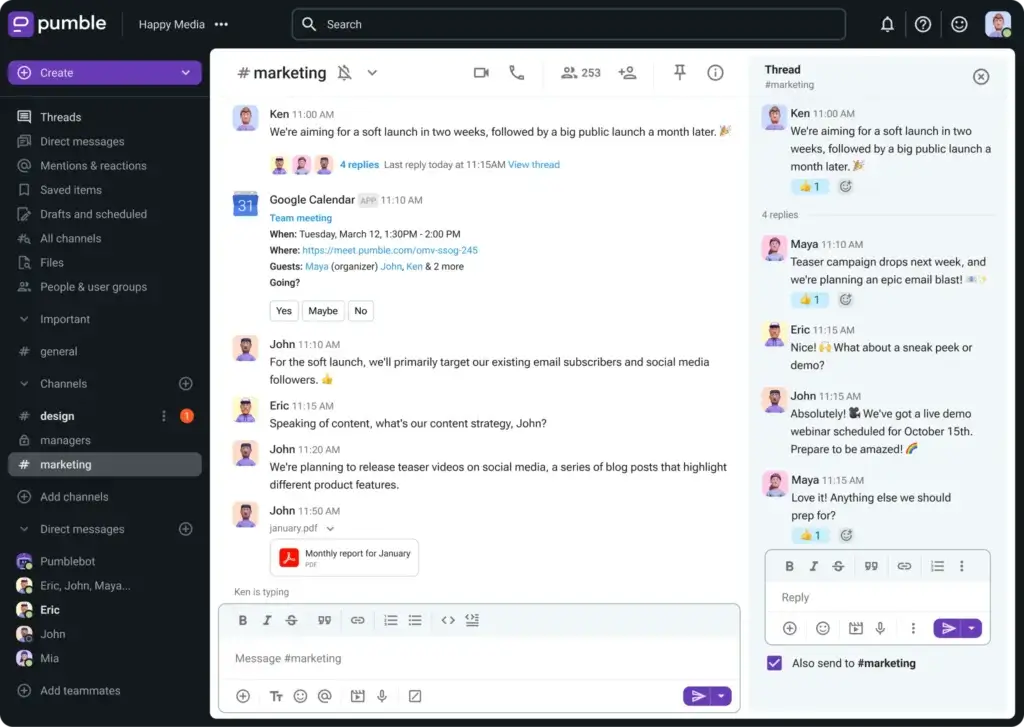
Pumble’s user experience is clean, familiar, and practical. It does not feel overloaded with features, which is a strength if your team wants less noise and faster communication.
Clean, clutter-free layout
The interface uses the familiar team chat structure: channels on the side, conversations in the center, and message actions available when needed.
This makes Pumble easy for new users. If someone has used Slack, Discord, or Microsoft Teams, they will understand the basic layout quickly.
- Channels and direct messages are easy to find
- Threads help keep side conversations organized
- Mentions make urgent updates easier to track
- Light and dark modes support different work preferences
Lightweight performance
Pumble feels lighter than many larger collaboration suites. That matters for teams that already use many SaaS tools and do not want another slow, resource-heavy application open all day.
The desktop, web, and mobile experiences are consistent enough for hybrid teams. A teammate can start a discussion on desktop and continue replying from a phone without losing the thread.
Mobile usability
The mobile app is important for remote teams, field teams, managers, consultants, and employees who move between meetings. Pumble’s mobile experience is straightforward, with push notifications, file access, and voice or video communication.
It is not overloaded with advanced menus, which makes it suitable for teams that prioritize practical communication over deep customization.
Use experience summary: Pumble is best for teams that want a focused communication app. It is not the most customizable chat platform, but it is easy to adopt and does the basics well.
What You Get for Free
Pumble Free Plan Review
The Pumble free plan is the main reason this tool deserves attention. Unlike many freemium collaboration tools, the free plan is not just a limited trial. It is usable for real teams.
You get unlimited users, unlimited message history, unlimited channels, 1:1 meetings, voice and video messages, Slack import, file sharing, export options, and limited integrations.
That makes Pumble especially attractive if your team is early-stage, distributed, or growing quickly. You can add new users without immediately increasing your monthly software bill.
What is included in the Pumble free plan?
- Unlimited users
- Unlimited message history
- Unlimited public and private channels
- 1:1 voice and video meetings
- Voice and video messages
- 10GB workspace storage
- Slack import
- Quote messages
- Up to 3 apps and integrations
What are the free plan limitations?
The free plan is generous, but it is not unlimited in every area. You will need to upgrade if you want group meetings, screen sharing, meeting recordings, more storage, more integrations, guest access, advanced permissions, user groups, SSO, or data retention.
For a small internal team, the free plan may be enough. For a client-facing agency, remote company, or growing business, the Pro or Business plan will usually be more practical.
Pricing and Packages
Pricing and Plans for Pumble
Pumble’s pricing is one of its strongest selling points. The free plan is genuinely useful, while paid plans remain affordable compared with many team communication tools.
The most important thing to understand is that you do not need to pay just to keep your team’s message history. The upgrade decision is more about meetings, storage, integrations, guests, permissions, SSO, and data retention.
Pumble pricing table
| Plan | Annual Price | Monthly Price | Best For | Key Features |
| Free | $0 | $0 | Small teams and startups | Unlimited users, unlimited history, 10GB workspace storage, 1:1 meetings, Clockify and Plaky integrations, up to 3 additional integrations |
| Pro | $2.49/user/month | $2.99/user/month | Teams needing group meetings | Group meetings, screen sharing, screen share annotations, 10GB storage per seat, up to 10 integrations |
| Business | $3.99/user/month | $4.99/user/month | Growing teams needing more control | Guest access, user groups, permissions, meeting recordings, 20GB storage per seat, unlimited integrations |
| Enterprise | $6.99/user/month | $7.99/user/month | Larger teams with security needs | SSO, data retention, 100GB storage per seat, Enterprise-level control, all Business features |
| CAKE.com Bundle | $12.99/user/month | $15.99/user/month | Teams needing chat, time tracking, and project management | Pumble Enterprise features plus Clockify and Plaky in one productivity suite |
Pumble plan comparison by feature
The price table is helpful, but the real buying decision depends on what each plan unlocks. This is where Pumble’s plan comparison becomes more useful.
| Feature | Free | Pro | Business | Enterprise |
| Message history | Unlimited | Unlimited | Unlimited | Unlimited |
| File storage | 10GB total | 10GB per seat | 20GB per seat | 100GB per seat |
| Screen sharing | No | Yes | Yes | Yes |
| Video conferencing | No | Up to 50 members | Up to 100 members | Up to 100 members |
| Group voice meetings | No | Up to 50 members | Up to 100 members | Up to 100 members |
| Guest access | No | No | Yes | Yes |
| Permissions | No | No | Yes | Yes |
| User groups | No | No | Yes | Yes |
| Integrations | Up to 3 | Up to 10 | Unlimited | Unlimited |
| SSO | No | No | No | Yes |
| Data retention | No | No | No | Yes |
Which Pumble plan should you choose?
Choose Free if you need basic team chat, unlimited history, 1:1 calls, and simple internal communication.
Choose Pro if your team needs group meetings, screen sharing, screen share annotations, and more storage per user.
Choose Business if you need guest users, role permissions, user groups, meeting recordings, unlimited integrations, and better controls for a growing team.
Choose Enterprise if your company needs SSO, custom data retention, 100GB storage per seat, and stronger administrative control.
Choose the CAKE.com Bundle if you also want Clockify for time tracking and Plaky for project management alongside Pumble.
For most small teams, the Free or Pro plan will be enough. For agencies, client-facing teams, and growing remote companies, Business is the better long-term fit because guest access, permissions, and meeting recordings are more practical.
CAKE.com Bundle: When Pumble, Clockify, and Plaky Make Sense Together
The CAKE.com Bundle is important because Pumble is not only sold as a standalone team communication app. The bundle combines Pumble for communication, Clockify for time tracking, and Plaky for project management under one productivity suite.
This is valuable if your team currently pays for separate tools for chat, time tracking, and project coordination. Instead of buying Slack, a time tracker, and a project management tool separately, the CAKE.com Bundle gives you a connected suite with unified account management and shared ecosystem benefits.
The main caveat is that the bundle does not include Clockify data regions. If your company has strict data residency requirements, review this point before choosing the bundle.
Governance and Privacy
Security and Admin Controls
Security is an important part of any team communication tool because chat apps often contain internal decisions, customer context, operational updates, files, and project discussions.
Pumble covers the basic security requirements most small and mid-sized teams expect, but governance features are plan-dependent. That means the Free and Pro plans are suitable for simpler internal communication, while Business and Enterprise are better fits for teams that need stronger admin control.
Security and admin features by plan
| Feature | Free | Pro | Business | Enterprise |
| Data encryption | Yes | Yes | Yes | Yes |
| SOC 2 | Yes | Yes | Yes | Yes |
| Phone, chat, and email support | Yes | Yes | Yes | Yes |
| Priority customer support | No | Yes | Yes | Yes |
| Guest access | No | No | Yes | Yes |
| Permissions | No | No | Yes | Yes |
| User groups | No | No | Yes | Yes |
| Single sign-on | No | No | No | Yes |
| Data retention | No | No | No | Yes |
Is Pumble secure enough for business use?
For most small and mid-sized teams, yes. Pumble has the security foundation you would expect from a modern SaaS communication tool, including encryption, support, and SOC 2 coverage across plans.
For larger organizations, the better question is not whether Pumble is secure enough, but which plan provides the governance controls your IT team needs. Guest access, permissions, and user groups start on Business, while SSO and data retention are Enterprise features.
If your company operates in a heavily regulated industry or needs detailed compliance workflows, review the Enterprise plan carefully and compare it with Slack Enterprise Grid, Microsoft Teams, Mattermost, or Rocket.Chat.
Customer Experience
User Feedback and Reviews
User reviews generally support the same pattern that appears in hands-on evaluation: Pumble is easy to use, affordable, familiar for Slack users, and strong for teams that want straightforward communication without extra complexity.
Software Advice currently shows Pumble with a 4.7 overall rating based on more than 200 reviews. The review patterns are consistent: users tend to praise ease of use, value for money, customer support, and the free plan, while asking for more integrations, more advanced meeting features, and deeper admin controls.
Review-platform snapshot
| Review Signal | What It Suggests |
| Strong ease-of-use feedback | Pumble is easy for non-technical teams to adopt |
| Strong value-for-money feedback | The free plan and low-cost paid plans are a real advantage |
| Positive customer support comments | Support quality is a useful trust signal for small businesses |
| Feature feedback is more mixed | Users may want more advanced integrations, automation, and meeting tools |
| Daily usage appears common in reviews | Pumble can work as a primary day-to-day team chat app |
What users tend to like
- Easy onboarding and simple workspace setup
- Clean interface that feels familiar to Slack users
- Free plan with unlimited users and message history
- Reliable messaging for remote and hybrid teams
- Good value for small businesses and startups
What users want improved
- More native integrations with popular business tools
- More advanced customization options
- Broader workflow automation features
- More robust meeting features on lower plans
- More enterprise-grade reporting and analytics
The overall pattern is clear: Pumble is highly attractive for teams that want simple and affordable communication, but less ideal for companies that want their chat tool to become the central automation hub for every department.
Free Slack Alternative Comparison
Pumble vs Slack
The most important comparison is Pumble vs Slack. These tools look similar in many ways, but they serve different priorities.
Slack is stronger for integrations, enterprise workflows, app marketplace depth, built-in AI, and mature collaboration features. Pumble is stronger for free message history, affordability, and simple team chat.
| Category | Pumble | Slack |
| Free message history | Unlimited | 90 days |
| Free integrations | Up to 3 apps, plus Clockify and Plaky native integrations | Up to 10 apps |
| Paid integration depth | Growing marketplace, Zapier, API, webhooks, and native CAKE.com tools | 2,600+ app directory and broader workflow ecosystem |
| AI features | AI Assistant and MCP Server through integrations | Built-in AI features such as summaries, search, recaps, and Slackbot features |
| Meetings | 1:1 free, group meetings on paid plans | 1:1 free, group huddles on paid plans |
| Starting paid price | $2.49/user/month when billed annually | Higher starting paid price |
| Best for | Low-cost team chat with unlimited history | Advanced workflows, integrations, AI, and enterprise collaboration |
Choose Pumble if
- You want unlimited message history for free
- You need a low-cost Slack alternative
- Your team values simplicity over customization
- You want optional AI add-ons without paying Slack-level pricing
- You do not rely heavily on Slack apps
Choose Slack if
- You need a large integration ecosystem
- Your company has complex workflow automation needs
- You use many third-party business apps
- You want more mature built-in AI features
- You need more mature enterprise collaboration features
My recommendation: Pumble is the better value for small teams, early-stage companies, nonprofits, and organizations that mainly need messaging. Slack is better for larger teams that rely on integrations, AI, automation, and advanced workflow maturity.
Pumble VS Alternatives
Comparison with Other Chat Software
Pumble is not the only Slack alternative worth considering. The right choice depends on whether your team needs pure chat, project management, AI-supported communication, open-source deployment, or Microsoft 365 integration.
| Tool | Core Focus | Best For | Main Advantage |
| Pumble | Team chat and communication | Teams needing affordable Slack-like chat | Unlimited users and message history on free plan |
| ClickUp Chat | Chat inside work management | Teams managing tasks, docs, projects, and communication together | Combines chat with broader productivity workflows |
| Zenzap | Business messaging with productivity features | Teams wanting a modern, mobile-friendly communication app | Simple business-first messaging experience |
| Slack | Business messaging and app ecosystem | Teams relying heavily on integrations | Large marketplace and mature workflow tools |
| Microsoft Teams | Microsoft 365 communication hub | Companies already using Microsoft 365 | Deep Office, calendar, and meeting integration |
| Rocket.Chat | Open-source communication | Teams needing more control and deployment flexibility | Open-source and self-managed options |
| Mattermost | Secure team collaboration | Technical teams and organizations with control requirements | Strong self-hosting and developer team fit |
Use Pumble if
- You need a dedicated team chat app
- You want unlimited free message history
- You prefer simple onboarding and low pricing
- You want an easy Slack alternative without a steep learning curve
Use ClickUp Chat if
- You want chat connected to tasks, docs, goals, and project work
- Your team already works inside ClickUp
- You need a broader productivity system, not only messaging
👉🏼 Read our FULL ClickUp Chat review
Use Zenzap if
- You want a modern business messaging experience
- You prefer mobile-friendly communication
- You want a tool that feels focused on workplace chat rather than general social messaging
👉🏼 Read our FULL Zenzap review
For a broader view of the market, you can also compare more options in our Best Business Chat Comparison.
Product Roadmap
Recently Added and Upcoming Pumble Features
Pumble is changing quickly, so the roadmap is worth mentioning in a review. Several features that make Pumble more competitive have recently been finished, while others are still planned.
Recently added features worth noting
- AI Assistant add-on for AI answers and summaries inside Pumble
- MCP Server for connecting approved AI agents to Pumble
- Jira integration for task updates in Pumble
- Zendesk integration for support ticket workflows
- Google Drive integration for file collaboration
- App builder for private workspace apps
- Screen share annotations during meetings
- Clockify notifications and Plaky link previews
- Bulk actions on the Files page
Roadmap features to watch
- Asana and monday.com integrations
- Admin analytics
- Automations
- Content search across images and documents
- VIP notifications
- Global sidebar sections
- Preview unread messages
- Blocklist controls
This roadmap matters because Pumble’s biggest historical weakness has been depth. If Pumble continues improving integrations, AI, automation, analytics, and admin control, it will become more competitive against Slack and Microsoft Teams for growing teams.
Limitations to Consider
Where Pumble Falls Short
Pumble is a strong tool, but it is not the best choice for every team. The limitations are not dealbreakers for everyone, but they matter if your communication workflow is complex.
Smaller integration ecosystem
Pumble has useful integrations, API options, AI Assistant, and MCP support, but Slack is still far ahead if you want a large app marketplace. Teams that depend on many SaaS connections may still feel the difference.
No full project management layer
Pumble helps your team communicate, but it does not replace task boards, timelines, workload views, resource planning, automations, or project dashboards.
If you need project execution features, pair Pumble with tools like Plaky, ClickUp, monday.com, Asana, or Teamwork.
Advanced meeting features require paid plans
The free plan supports 1:1 meetings, which is useful. But if your team needs group calls, screen sharing, and meeting recordings, you will need to upgrade.
Enterprise controls are plan-dependent
SSO and data retention are valuable for larger organizations, but they are Enterprise features. If your IT team requires those controls, the free or lower paid plans may not be enough.
Conclusion
Is Pumble the Right Fit for Your Business?
Pumble is a strong choice if your team needs a simple, affordable, and reliable business chat app. Its free plan is one of the most generous options in the team communication market because it includes unlimited users and unlimited message history.
That makes it especially appealing for startups, nonprofits, remote teams, educators, and small businesses that want to avoid the rising cost of per-seat communication tools.
The main trade-off is that Pumble is not as deep as Slack for integrations and native AI, not as complete as Microsoft Teams for enterprise collaboration, and not as broad as ClickUp if you need project management.
Still, Pumble does what it is designed to do very well: it gives your team a clean place to communicate, organize conversations, share files, and stay connected without unnecessary complexity.
Who should use Pumble?
- Small to mid-sized teams that want unlimited chat history
- Remote and hybrid teams that need reliable messaging
- Startups that want to avoid high per-seat costs
- Nonprofits and education teams with tight budgets
- Slack users looking for a more affordable alternative
Who should consider another tool?
- Teams that need a large native integration marketplace
- Companies already standardized on Microsoft 365
- Organizations needing self-hosted or open-source chat
- Teams that want chat, tasks, docs, native AI, and automation in one platform
Final recommendation: Pumble is one of the best free Slack alternatives if your priority is affordable, straightforward team communication. It is not the most advanced collaboration suite, but for messaging, channels, calls, and value for money, I recommend it.
Frequently Asked Questions (FAQs)
Have more questions?
-
Is Pumble really free?
Yes. Pumble has a free plan that includes unlimited users, unlimited message history, unlimited channels, 1:1 meetings, file sharing, and 10GB of workspace storage. Paid plans are needed for group meetings, screen sharing, more storage, more integrations, guest access, SSO, and data retention.
-
What is included in the Pumble free plan?
The Pumble free plan includes unlimited users, unlimited message history, unlimited channels, 1:1 voice and video meetings, voice and video messages, Slack import, 10GB workspace storage, quote messages, and up to 3 apps and integrations. Clockify and Plaky are native integrations and do not count toward those limits.
-
How much does Pumble cost?
Pumble has a free plan. Paid plans start at $2.49 per user per month when billed annually for Pro, $3.99 per user per month for Business, and $6.99 per user per month for Enterprise. Monthly billing costs more.
-
How many people can join Pumble meetings?
Pumble supports 1:1 voice and video meetings on the free plan. Pro supports video conferencing and group voice meetings for up to 50 members, while Business and Enterprise support up to 100 members.
-
Does Pumble have AI features?
Yes. Pumble offers an AI Assistant integration and an MCP Server. The AI Assistant can be used in direct messages or mentioned in selected channels, while MCP lets approved AI agents connect to Pumble based on granted permissions.
-
What is Pumble MCP?
Pumble MCP is a Model Context Protocol server that lets approved AI agents connect to Pumble. Depending on the scopes selected by an admin, an AI agent can search messages, fetch files, read channel information, send messages, reply in threads, or create call links.
-
Is Pumble better than Slack?
Pumble is better than Slack if your priority is a generous free plan, unlimited message history, and lower pricing. Slack is better if your team needs a larger integration marketplace, built-in AI features, mature workflow automation, and advanced enterprise collaboration.
-
Does Pumble integrate with Clockify and Plaky?
Yes. Pumble has native integrations with Clockify for time tracking and Plaky for project management. These integrations are especially useful if your team uses the CAKE.com productivity suite.
-
Is Pumble secure?
Pumble includes security and admin features such as data encryption, SOC 2 coverage, support, permissions on Business, guest access on Business, SSO on Enterprise, and data retention on Enterprise.
-
What are the best Pumble alternatives?
The best Pumble alternatives include Slack for integrations and AI, Microsoft Teams for Microsoft 365 users, ClickUp Chat for project-focused teams, Zenzap for business messaging, Rocket.Chat for open-source flexibility, and Mattermost for technical teams that need more control.