
Introduction
OpusClip promises to turn podcasts, webinars, interviews, livestreams, tutorials, and other long recordings into social-ready clips. It finds potential highlights, reframes footage, adds captions, and prepares content for TikTok, Instagram Reels, YouTube Shorts, LinkedIn, and other channels.
The real question is whether those clips are publishable. This OpusClip review 2026 examines the platform’s AI clipping, editing, captions, pricing, credits, publishing workflow, and alternatives, with particular attention to how much human review remains. OpusClip is a capable specialist, but its credit model, temporary lower-tier storage, and inconsistent AI judgment require careful evaluation.
What Is OpusClip?
OpusClip is an AI video clipping and editing platform that analyzes speech, visuals, sound, emotion, and narrative structure to find moments that may work as standalone social posts.
It produces clips with captions, reframing, titles, descriptions, and a Virality Score. Paid users can refine the transcript and timeline, apply branding, add media, and publish approved clips. It does not replace an advanced editor, but it can shorten the path from long recording to repeatable short-form output.
Who OpusClip Is Designed For
- Video podcasters – Turn interviews and episodes into multiple captioned highlights.
- Marketing teams – Repurpose webinars, customer stories, product demos, and thought leadership.
- Coaches and educators – Extract lessons, explanations, and memorable statements from long recordings.
- Streamers and gaming creators – Identify reactions, plays, conversations, and visually active moments.
- Agencies – Create repeatable short-form workflows for several clients and brands.
- Media organizations – Automate clipping through team workflows, APIs, and custom integrations.
OpusClip is less useful when you rarely produce long-form video, require frame-perfect manual editing, or need every clip to follow a carefully scripted narrative.
Key Features
AI Clipping, Editing, and Publishing
ClipAnything AI Curation
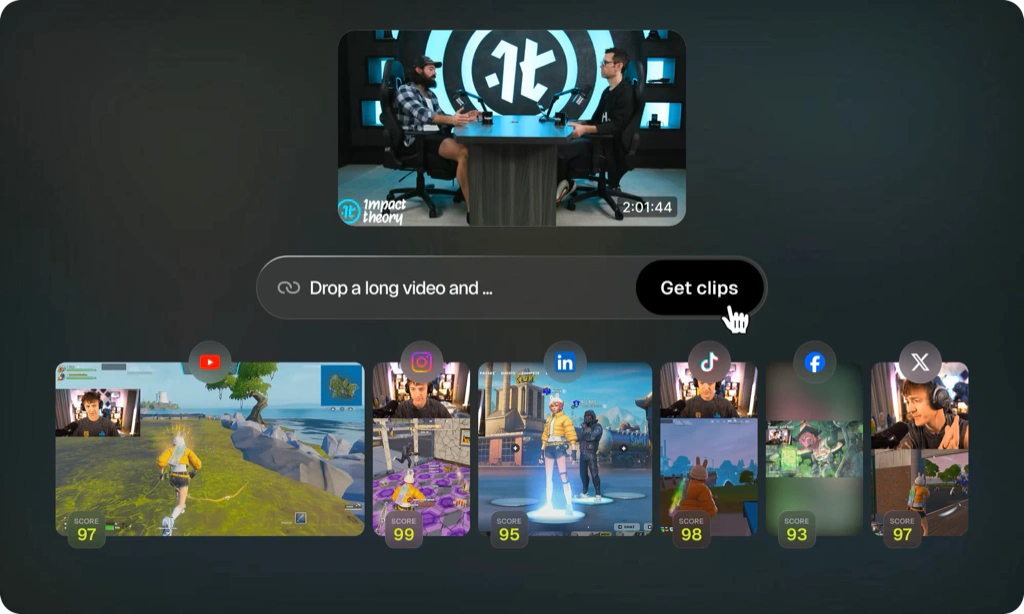
ClipAnything is OpusClip’s main differentiation. It analyzes speech alongside visual objects, movement, sound, emotion, and genre signals, so it can work with podcasts, vlogs, gaming, sports, explainers, commentary, and product content.
You can prompt for specific topics, select a timeframe, and choose clip lengths. OpusClip estimates that a 30 to 60-minute source may produce roughly 23 to 32 clips, but the useful metric is how many coherent clips deserve editing and publication.
Virality Score and Clip Ranking
Starter and Pro users receive a Virality Score from 0 to 99 based on factors such as hook, flow, value, emotional connection, trends, and prompt relevance. The score helps you prioritize dozens of suggestions, but it cannot predict distribution, audience fit, timing, or platform behavior.
Use it to reduce review time, not to replace judgment. A lower-scoring customer insight may be more valuable to a B2B audience than a generic high-scoring statement.
Automatic Reframing and Subject Tracking
ReframeAnything adapts wide footage for vertical, square, and landscape outputs. It tracks subjects, switches layouts, and supports screen-share or gameplay formats. Pro includes 9:16, 1:1, and 16:9 outputs.
Results are strongest with stable talking heads. Review every scene change when people move, important action occurs away from the speaker, or the source alternates between a face and a detailed screen.
Animated Captions and Multilingual Transcription
OpusClip adds animated captions with emoji and keyword highlighting in more than 25 transcription languages. Some languages remain in beta, so caption accuracy and highlighting may vary.
You can correct words, adjust timing, change templates, and use custom fonts or brand vocabulary on eligible plans. Review names, brands, numbers, and acronyms before publishing.
Text and Timeline-Based Video Editor
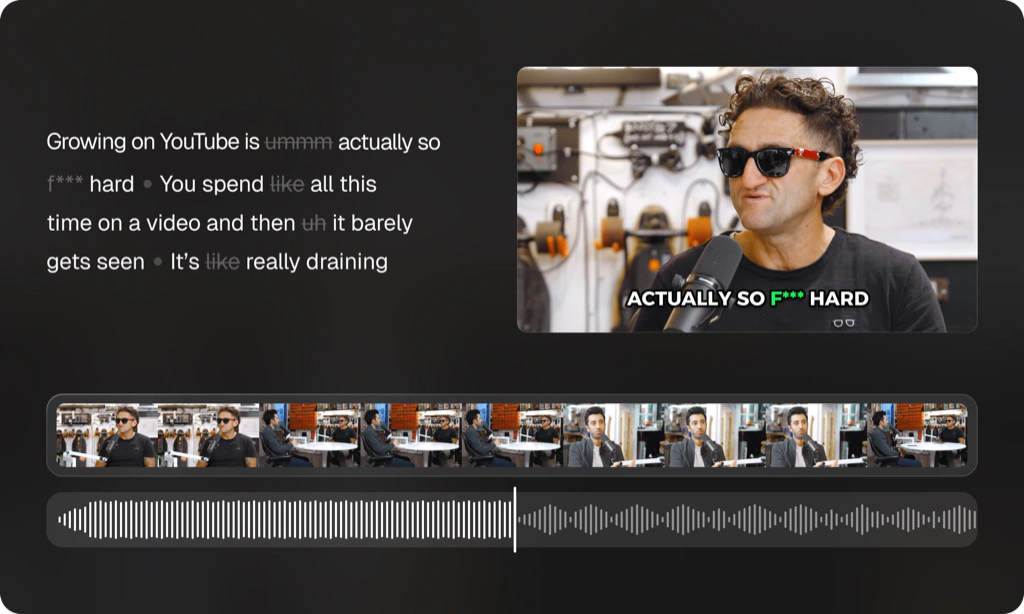
Paid plans combine transcript and timeline editing. You can trim clips, rearrange scenes, correct captions, add overlays, media, music, transitions, and remove filler words or pauses.
The editor handles routine social polishing but not advanced motion, audio, color, or multicamera work. Pro can export to Adobe Premiere Pro and DaVinci Resolve. Correct animated captions before XML export because they are transferred as overlays.
AI B-Roll, Voiceovers, Hooks, and Speech Tools
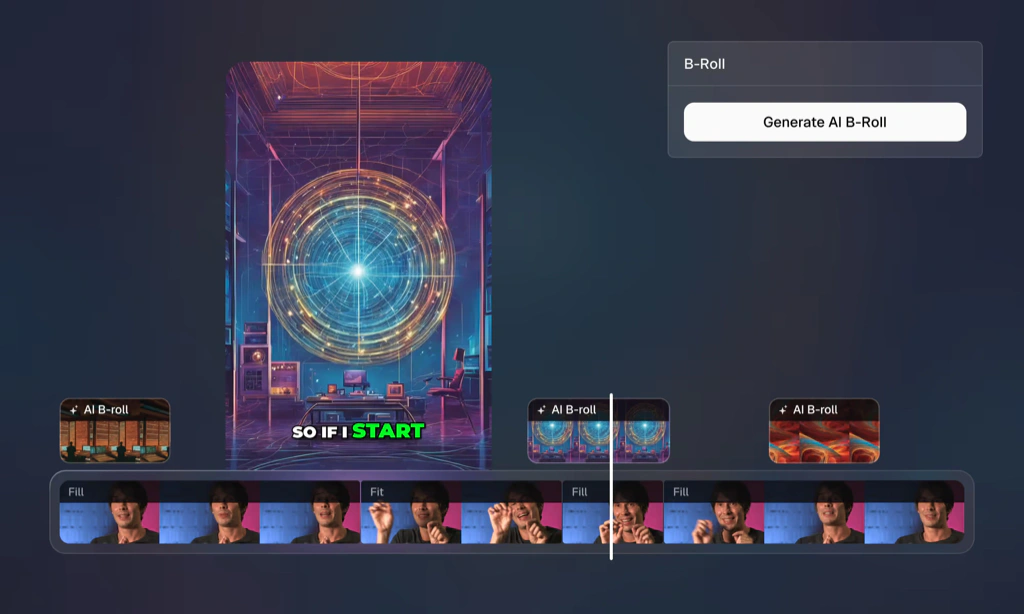
OpusClip can add AI images, stock footage, generated video B-roll, sound effects, hooks, and voiceovers. You can reposition, trim, or regenerate B-roll, while speech enhancement and filler removal clean up dialogue.
These tools create brand-safety risk. Review inserted footage, images, hooks, and audio for relevance, rights, accuracy, and tone. Pro provides the stronger allowances, although daily limits can apply.
Brand Templates and Reusable Assets
Brand templates store caption styles, colors, logos, fonts, intros, and outros. Starter includes one template, while a base Pro pack includes two. Teams should also document acceptable hooks, claims, music, and approval rules because a visual template does not control editorial voice.
Social Posting and Scheduling
Starter posts directly to YouTube Shorts, TikTok, and Instagram Reels. Pro adds LinkedIn, Facebook, X, multiple connections, scheduling, and generated titles, descriptions, and hashtags. Review copy by channel because the same context rarely works equally well everywhere.
Team Workspace, OpusSearch, and API Options
Pro includes two seats per pack, shared credits, project organization, and reusable assets, scaling to four users through two packs. Business adds customized seats, storage, folders, support, security, and integrations.
OpusSearch can index a library for searches by topic, speaker, phrase, or mood. API, Zapier, MCP, and scheduler access varies by plan and rollout, so confirm eligibility. Business is safer when automation is production-critical.
User Experience
What the AI Gets Right and Where It Needs Review
Where OpusClip Performs Best
OpusClip performs best with clear, self-contained ideas, clean audio, limited cross-talk, and stable framing. Interviews, webinars, podcasts, and tutorials with distinct teaching points give the model recognizable boundaries.
For these sources, the platform can remove hours of scrubbing. User reviews commonly praise time savings, usable starting points, captions, and automatic framing.
Where the AI Is Less Reliable
Results weaken when conversations rely on earlier context, humor develops slowly, speakers interrupt, or the important visual is not the person talking. AI may miss the setup, cut the conclusion, overstate a claim, or create duplicates.
Treat OpusClip as a first-edit assistant, not an autonomous publisher.
The Editorial Acceptance Rate Test
A more useful performance metric than “clips generated” is your editorial acceptance rate: the percentage of suggestions that become publishable with a reasonable amount of work.
| Acceptance Rate | What It Usually Means | Recommended Action |
| 60% or higher | Your source format and prompts fit the model well | Build templates and automate more of the workflow |
| 30% to 59% | The tool saves review time but still needs active editing | Improve prompts, source structure, and clip criteria |
| Below 30% | Too many clips lose context or require rebuilding | Compare a more manual editor or another AI clipper |
Track the rate across three to five representative videos, along with editing time and cost per published clip. This reveals more than a one-video demo.
Processing Speed and Reliability
Processing time depends on source length, plan priority, quality, and demand. OpusClip says failed projects and those taking more than 90 minutes receive automatic credit reimbursement.
Upload time-sensitive content early, process selected timeframes, and keep source files outside the platform.
Pros and Cons
Benefits and Limitations of OpusClip
Positive
✅ Strong automated clip discovery
✅ Works across varied video genres
✅ Useful captions and reframing
✅ Integrated editing and scheduling
✅ Team and workflow automation options
Negative
❌ AI clips still require review
❌ Credit model needs monitoring
❌ Short lower-tier storage windows
❌ Advanced features favor Pro
❌ Limited self-serve team scale
Strengths and Benefits
- Strong discovery – Surfaces potential highlights without manual scrubbing.
- Broader genre support – Uses visual, audio, and emotional signals.
- Integrated workflow – Combines captions, reframing, editing, branding, and publishing.
- Useful automation – Supports scheduling, team workspaces, exports, APIs, and integrations.
Limitations and Drawbacks
- Human review is essential – AI can remove context, misframe subjects, or repeat moments.
- Credits measure input – A 60-minute source uses about 60 credits regardless of accepted output.
- Lower-tier storage is temporary – Free and Starter require timely exports.
- Pro holds the full workflow – Formats, scheduling, teams, storage, and advanced AI favor Pro.
Pricing and Plans
Credits, Limits, and Value
OpusClip offers Free, Starter, Pro, and Business plans. Pricing below was checked in August 2026. The platform uses credits, and one credit generally processes one minute of the original imported video. Posting or scheduling to X also uses one credit per published clip.
| Plan | Price | Credits | Storage and Seats | Best For |
| Free | $0 | 60 per month | Exports expire after 3 days, 1 user | Testing clip selection and captions |
| Starter | $15/month | 150 per month | Projects expire after about 29 days, 1 user | Light individual repurposing |
| Pro | $29/month or $174/year | 300 monthly or 3,600 annually | 100GB, 2 seats per pack | Regular creators, marketers, and small teams |
| Business | Custom | Customized | Customized storage and seats | Agencies, media teams, and automated pipelines |
Free Plan
The Free plan includes 60 monthly credits, video rendering up to 1080p, automatic reframing, and AI captions with emoji and keyword highlighting. It adds an OpusClip watermark, does not include editing, and makes clips unavailable for export after three days.
This plan is useful for testing whether the model understands your content. Use it with a representative video, not your easiest recording. Evaluate clip boundaries, caption accuracy, framing, and duplicate suggestions before paying.
Starter Plan
Starter costs $15 per month and is available only with monthly billing. It includes 150 credits, Virality Scores, animated captions, editing, one brand template, filler and silence removal, watermark-free exports, and direct posting to YouTube, TikTok, and Instagram.
Starter is suitable for a solo creator processing roughly two or three hour-long videos per month. Its main compromise is workflow depth. It lacks the Pro scheduler, wider aspect ratios, team workspace, 100GB persistent storage, broad import library, advanced exports, and larger AI allowances.
Pro Plan
Pro costs $29 with monthly billing and includes 300 credits per month. The annual base pack costs $174, equivalent to $14.50 per month, and provides 3,600 credits upfront for the year. Monthly credits remain valid for 60 days, while annual credits remain valid for 12 months.
Pro includes two workspace seats per pack, two brand templates, six social account connections, 100GB of fixed storage, multiple aspect ratios, broader imports, bulk export, Premiere Pro and DaVinci Resolve export, social scheduling, custom fonts, speech enhancement, AI B-roll, dubbing, and limited API access.
This is the best-value plan for users who publish short-form content consistently. It is also the minimum practical tier for teams and multi-channel workflows.
Business Plan
Business uses custom pricing for larger credit, seat, storage, brand, security, and integration requirements. It adds priority processing, custom folders, tailored assets, API and CMS integrations, an MSA, onboarding, invoicing, and dedicated support.
Request clear commitments around throughput, API access, storage, support, security, and retention.
The Real Cost per Publishable Clip
Credits are based on source minutes, so a 60-minute video uses about 60 credits whether it creates two publishable clips or fifteen. Divide subscription cost by clips actually published, then add editing time. High-volume creators should compare this result with alternative usage models.
Controls for Creators and Teams
OpusClip Security and Data Handling
Video repurposing platforms handle source recordings, transcripts, connected social accounts, brand assets, and unpublished content. This makes security and retention part of the buying decision, especially for agencies, regulated organizations, and teams clipping internal meetings or customer material.
Platform Security Controls
OpusClip states that its service is SOC 2 Type II compliant and uses email one-time-password login. Business adds enterprise controls such as single sign-on, software license management, an MSA, tailored onboarding, and priority support. The company’s Trust Center also references formal data retention and disposal policies.
These controls provide a useful baseline, but Business buyers should request the current security package and confirm subprocessors, data locations, incident procedures, deletion timelines, access logging, and contractual retention terms.
Storage and Content Retention
Retention differs by plan. Free clips become unavailable for export after three days, Starter projects expire after about 29 days, and Pro includes 100GB of fixed storage. Business storage is customized.
Temporary storage can protect against uncontrolled accumulation, but it also creates operational risk. Export approved clips, transcripts, captions, and source-linked project files to your own storage. Delete sensitive recordings after production and avoid uploading material that your organization is not authorized to process through a third-party AI service.
Connected Social Accounts
Direct publishing requires account permissions. Use dedicated business accounts, limit access to approved team members, review connected channels regularly, and disconnect unused profiles. For high-risk brands, keep final publishing approval separate from editing so an AI-generated clip cannot move directly from processing to a public channel without review.
Best Use Cases and Poor Fits
Who Should Use OpusClip?
Best for Video Podcasts and Interviews
Podcasts contain many hooks, insights, reactions, and stories. OpusClip can create a first selection, caption it, follow speakers, and prepare vertical versions for review.
Best for Webinar and B2B Content Repurposing
Marketing teams can turn webinars, customer interviews, product demos, and executive conversations into a publishing calendar. Prompt-based clipping helps find specific pain points, features, objections, or outcomes.
Best for Streamers and Visual Content
ClipAnything supports gaming, sports, vlogs, and livestreams better than dialogue-only tools, although visually active footage requires closer framing review.
Best for Agencies With Repeatable Standards
Agencies can standardize client production with templates, shared credits, social connections, and Business integrations. Keep AI generation separate from approval.
Not Ideal for Occasional or Fully Manual Editing
OpusClip is harder to justify for occasional clips, short-form source footage, or tightly controlled storytelling. A manual editor may provide better value.
Best OpusClip Alternatives
Competitors for Different Workflows
Vizard – Best Direct Alternative for AI Clipping
Vizard is the closest direct alternative, with AI clipping, captions, reframing, editing, and collaboration. Choose OpusClip for ClipAnything, Virality Score, and its automation ecosystem. Test both with the same videos because quality varies by format.
Descript – Best for Transcript-Based Editing
Descript is better for precise dialogue editing, restructuring, and audio cleanup. OpusClip is faster for first-pass highlight discovery and social formatting. Read the complete Descript review.
Riverside – Best for Recording and Repurposing
Riverside is better when the workflow begins with high-quality remote recording and separate participant tracks. OpusClip is more specialized for clipping imported content. Explore the Riverside review.
CapCut – Best for Social-First Manual Editing
CapCut provides more hands-on control, effects, templates, transitions, and mobile editing. OpusClip finds moments across long recordings, while CapCut is better for creative polishing. Read the CapCut review.
VEED – Best for Browser-Based Team Video
VEED covers editing, subtitles, recording, collaboration, avatars, translation, and AI creation. OpusClip is the stronger clipping specialist, while VEED is the broader generalist. See the VEED review.
| Tool | Best For | Choose It Over OpusClip When |
| Vizard | Direct AI clipping alternative | Its editor, collaboration, or usage model fits better |
| Descript | Transcript-based editing | You need precise dialogue and narrative control |
| Riverside | Remote recording and repurposing | You need high-quality source capture and separate tracks |
| CapCut | Social-first manual editing | You prioritize effects, mobile editing, and creative control |
| VEED | Browser-based business video | You need a broader creation and collaboration platform |
Best Practices
Getting the Most Out of OpusClip
Record With Clips in Mind
Use clear transitions, summarize key points, and finish ideas before moving on. Strong source structure makes it easier for the AI to identify self-contained clips.
Prompt for Business Value, Not Generic Virality
Ask for specific objections, lessons, stories, mistakes, comparisons, or customer outcomes. A focused prompt usually produces a more useful content set than a broad request for viral moments.
Process Only the Relevant Timeframe
Credits are based on imported source minutes. Select the section that contains the useful discussion instead of processing a long introduction, break, or unrelated segment.
Create a Three-Step Review
Review meaning first, framing second, and captions third. This order prevents time being spent styling a clip that should not be published.
Export and Archive Final Assets
Do not rely on temporary Starter storage or a web platform as your only archive. Keep original recordings, approved exports, captions, and project files in a controlled storage system.
Measure Published Results
Track acceptance rate, editing minutes, cost per published clip, watch time, retention, shares, leads, and assisted conversions. Virality Score is an input, not a business result.
Conclusion
Final Thoughts on OpusClip
OpusClip is one of the most capable dedicated AI video clipping tools in 2026. Its value is reducing the footage you must review, not replacing creative judgment. Podcasters, marketers, streamers, educators, and agencies with steady long-form output can save substantial production time.
Credits depend on source length, lower-tier storage is temporary, and clips can lose context or need caption and framing corrections. For regular creators and small teams, Pro offers the strongest balance of scheduling, imports, formats, storage, team seats, AI tools, and editor exports.
OpusClip is recommended when your bottleneck is finding and preparing short-form moments. Descript offers deeper transcript editing, Riverside starts with stronger recording, CapCut gives more manual creativity, and VEED covers broader business video production.
Frequently Asked Questions
Have more questions?
-
What is OpusClip used for?
OpusClip is used to turn long videos into short social clips. It identifies highlights, reframes footage, adds captions, supports editing, applies branding, and publishes or schedules approved clips.
-
Is OpusClip free?
Yes. OpusClip has a Free plan with 60 monthly processing credits, 1080p rendering, automatic reframing, and AI captions. Free exports include a watermark and become unavailable after three days.
-
How do OpusClip credits work?
One credit generally processes one minute of the original imported video. A 30-minute source therefore uses about 30 credits. Posting or scheduling a clip to X also uses one credit.
-
Does OpusClip edit videos automatically?
OpusClip automatically finds moments, creates clips, reframes subjects, and adds captions. Paid users can refine the results with transcript and timeline editing, B-roll, overlays, audio tools, and brand templates.
-
What is the OpusClip Virality Score?
The Virality Score ranks clips from 0 to 99 based on factors such as hook, flow, value, emotional connection, trends, and prompt relevance. It is a review aid, not a guarantee of social reach.
-
Which languages does OpusClip support?
OpusClip supports transcription in more than 25 languages, including English, Spanish, German, French, Portuguese, Italian, Dutch, Japanese, Korean, and several others. Some languages remain in beta.
-
Can OpusClip post directly to social media?
Yes. Starter supports direct posting to YouTube Shorts, TikTok, and Instagram Reels. Pro adds a scheduler and broader publishing support for LinkedIn, Facebook, and X.
-
Is OpusClip good for podcasts?
Yes. Podcasts and interviews are among its strongest use cases because clear spoken ideas are easier to identify, caption, reframe, and turn into standalone social clips.
-
What is the best OpusClip plan?
Pro offers the best value for regular creators and small teams because it adds 300 monthly credits, team seats, multiple formats, social scheduling, 100GB storage, broader imports, AI B-roll, and editor exports.
-
What is the best OpusClip alternative?
Vizard is the closest direct AI clipping alternative. Descript is better for transcript editing, Riverside for recording and repurposing, CapCut for social-first manual editing, and VEED for broader browser-based video production.